
SAP BDC Architecture is becoming a critical topic for organizations modernizing analytics, planning, and AI on SAP landscapes.
If you’ve ever worked with SAP data in a real enterprise environment, you already know the pain.
Business data lives everywhere:
- SAP ECC or SAP S/4HANA for core transactional processes
- SAP BW or BW/4HANA for enterprise reporting
- Third-party platforms like Salesforce, ServiceNow, or Workday
- Cloud and hyperscaler platforms such as Azure, AWS, or Google Cloud
Each system speaks a different language. Each has its own security model, data semantics, and governance rules. And every new analytics, reporting, or AI initiative seems to require yet another custom data pipeline.
This fragmentation is exactly the problem SAP Business Data Cloud is designed to solve.
If you’re new to the platform, you may want to start with our detailed overview of SAP Business Data Cloud: The Unified Platform Solving Data Fragmentation, where we explain why SAP introduced BDC and how it fits into SAP’s modern data strategy.
In this guide, we go one step deeper and explain SAP BDC Architecture layer by layer, using real-world project scenarios rather than marketing slides. You’ll see how data sources, integration patterns, governance, semantic modeling, and consumption layers work together to deliver trusted, business-ready data for analytics, planning, and AI.
If you are a data analyst, data engineer, or SAP professional trying to understand SAP’s evolving data architecture in 2025 and beyond, this article is written for you.
What Is SAP Business Data Cloud (BDC)?
SAP Business Data Cloud (BDC) is SAP’s unified, cloud-based data and analytics platform that brings together:
- SAP business data (S/4HANA, SuccessFactors, Ariba, etc.)
- Non-SAP data (cloud data lakes, SaaS tools, APIs)
- Analytics, planning, and AI use cases
…without breaking business context or semantics.
In simple terms:
SAP BDC lets you consume trusted, business-ready data products across SAP and non-SAP systems—without copying everything or rebuilding logic from scratch.
SAP BDC is not just one tool. It’s an architecture and platform approach built on top of:
- SAP Datasphere
- SAP Analytics Cloud (SAC)
- SAP BW/4HANA (cloud-optimized)
- SAP Data Intelligence & integration services
- Open data sharing with hyperscalers
Official SAP reference: 👉 https://learning.sap.com/courses/introducing-sap-business-data-cloud
How SAP BDC Is Different from “Traditional” SAP Analytics
Before SAP BDC, most companies followed this path:
| Old Approach | Result |
|---|---|
| Extract SAP data into BW | Long project timelines |
| Replicate BW data to data lakes | Data duplication |
| Rebuild business logic in Power BI / Databricks | Loss of semantics |
| Manage security in multiple places | Governance nightmares |
SAP Business Data Cloud changes this model.
Instead of moving raw data everywhere, SAP BDC promotes:
- Semantic data products
- Federation and virtualization where possible
- Central governance with decentralized consumption
This shift is best understood by looking at SAP BDC architecture.
SAP BDC Architecture – Explained Layer by Layer
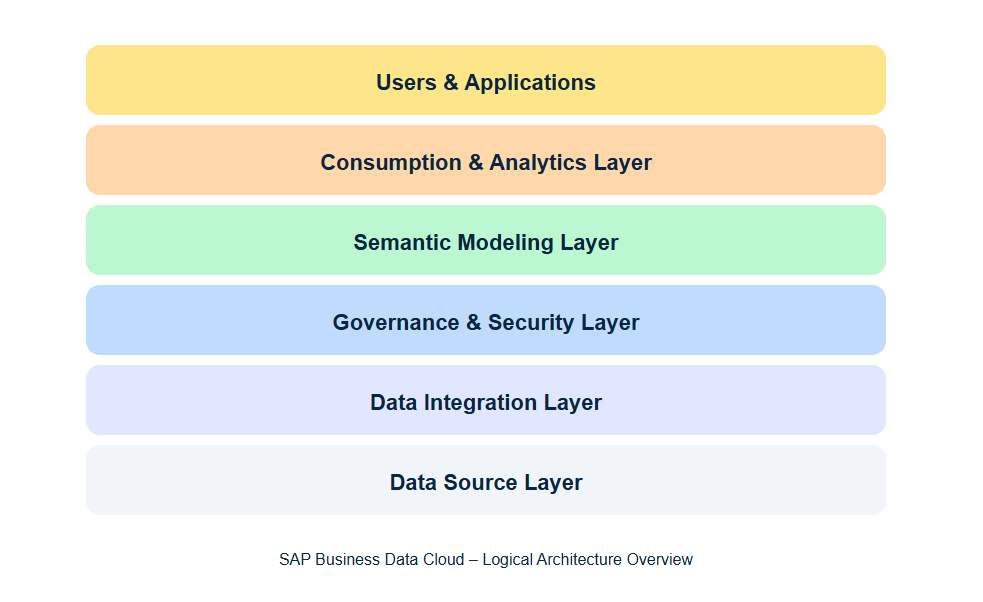
At a high level, SAP BDC architecture is organized into six logical layers. This layered approach is what makes SAP BDC Architecture scalable, governed, and suitable for real enterprise use cases. Understanding SAP BDC Architecture is essential for building trusted analytics and AI solutions on SAP data.
1. Data Source Layer – Where Data Is Born
The Data Source Layer is the foundation of SAP Business Data Cloud (SAP BDC). Every insight, dashboard, forecast, or AI model is only as good as the data that originates here.
In SAP BDC architecture, this layer represents all systems where business data is originally created, both SAP and non-SAP. The key idea is inclusion without disruption: SAP BDC does not force you to move everything into one place on day one.
What Lives in the Data Source Layer?
The Data Source Layer typically includes four major categories:
1️⃣ SAP Transactional Systems
These are the systems of record for core business processes.
Examples:
- SAP S/4HANA – Finance, Sales, Procurement, Manufacturing
- SAP ECC – Legacy ERP still widely used
- SAP SuccessFactors – HR data
- SAP Ariba / Concur – Procurement & expenses
Why this matters:
These systems contain highly structured, business-critical data with strong semantics (e.g., invoices, GL postings, sales orders). SAP BDC preserves this business meaning instead of flattening it into raw tables.
2️⃣ SAP Analytical Systems
Some organizations already have analytics platforms in place.
Examples:
- SAP BW / BW/4HANA
- Existing CDS Views
- Calculation Views (HANA)
SAP BDC does NOT replace these immediately.
Instead, it can federate or reuse them, allowing gradual modernization rather than a risky “big bang” migration.
3️⃣ Non-SAP Enterprise Systems
Modern enterprises rarely run on SAP alone.
Examples:
- Salesforce (CRM)
- ServiceNow (ITSM)
- Workday (HR)
- Oracle, Microsoft Dynamics
- Flat files, APIs, event streams
SAP BDC treats non-SAP data as first-class citizens, not second-class integrations.
This is critical for:
- Customer 360 views
- End-to-end process analytics
- Cross-system KPIs
4️⃣ Cloud & Big Data Platforms
This is where SAP BDC becomes cloud-native.
Examples:
- Azure Data Lake / Synapse
- AWS S3 / Redshift
- Google BigQuery
- Databricks
- Streaming platforms (Kafka, Event Hub)
Instead of forcing all this data into SAP, BDC allows virtual access or selective replication, depending on performance and governance needs.

Replication vs Federation at the Data Source Layer
In SAP Business Data Cloud, data from source systems can be consumed in two different ways, depending on business and technical needs:
- Replication – copying data into SAP Business Data Cloud
- Federation – accessing data directly where it already lives
Both approaches start at the Data Source Layer, and choosing the right one is critical for performance, cost, and governance.
Replication: Bringing Data into SAP Business Data Cloud
Replication means that data is physically copied from the source system into SAP-managed storage (such as SAP Datasphere / SAP HANA Cloud).
This approach is typically used when:
- Data must be highly performant
- Business users rely on consistent snapshots
- Planning, forecasting, or write-back is required
- Regulatory or financial controls apply
Example:
Finance data from SAP S/4HANA is replicated daily into SAP Business Data Cloud so it can be reused safely across reporting, planning, and close processes.
Replication gives SAP BDC full control over:
- Performance
- Security
- Semantic consistency
Federation: Accessing Data Without Copying It
Federation (also called virtual access) means that data remains in the source system, while SAP Business Data Cloud queries it in real time.
This approach is typically used when:
- Datasets are very large
- Data changes frequently
- The source platform is already optimized for analytics
- Copying data would increase cost or complexity
Example:
Clickstream or IoT data stored in Azure Data Lake remains in Azure, while SAP Business Data Cloud accesses it virtually for analytics and AI use cases.
Federation avoids unnecessary duplication and allows SAP BDC to work naturally with cloud-native platforms.
Why SAP BDC Uses Both
SAP Business Data Cloud does not force a single approach.
Instead, it allows a hybrid Data Source Layer, where:
- Critical business data is replicated
- Large or external datasets are federated
This flexibility is what allows SAP BDC to scale across:
- SAP and non-SAP systems
- On-premise and cloud platforms
- Traditional analytics and modern AI workloads
From a business user’s perspective, both replicated and federated data appear as one unified dataset, preserving trust and simplicity.
Why the Data Source Layer Is Strategic (Not Just Technical)
Many teams treat data sources as “just inputs.”
SAP BDC changes this mindset.
With SAP BDC:
- Data ownership stays close to source systems
- Governance rules start at the origin
- Business context is preserved early
- Data products are built on top, not instead of, source systems
This is why SAP BDC scales better than traditional ETL-heavy architectures.
Common Mistakes to Avoid at This Layer
From real projects, these are the most frequent issues:
❌ Replicating everything “just in case”
❌ Ignoring source system semantics
❌ Mixing raw technical tables with business consumption
❌ No source data ownership model
SAP BDC works best when the Data Source Layer is intentionally designed, not rushed.
Once the decision to replicate or federate data is made at the Data Source Layer, SAP Business Data Cloud uses the Data Integration Layer to manage how this data is technically connected, moved, or accessed.
2. Data Integration Layer – How Data Is Connected, Moved, or Accessed
Once data is identified in the Data Source Layer and the decision is made to replicate or federate, SAP Business Data Cloud relies on the Data Integration Layer to make that access technically possible.
In simple terms:
The Data Integration Layer defines how data flows from source systems into SAP Business Data Cloud — whether by copying it, accessing it virtually, or reacting to events.
This layer is where architecture decisions turn into working pipelines.
What Is the Role of the Data Integration Layer?
The Data Integration Layer is responsible for:
- Connecting SAP and non-SAP systems
- Managing replication pipelines
- Enabling federated (virtual) access
- Handling data freshness and latency
- Supporting batch, near real-time, and event-driven flows
It acts as the bridge between raw data sources and business-ready data inside SAP BDC.
Integration Patterns Supported in SAP BDC
SAP Business Data Cloud does not rely on a single integration method. Instead, it supports multiple patterns, depending on use case.
1️⃣ Batch Replication (Scheduled Loads)
This is the most common pattern for structured business data.
How it works:
- Data is extracted on a schedule (hourly, daily, nightly)
- Loaded into SAP-managed storage
- Optimized for reporting and planning
Typical use cases:
- Finance postings
- Master data
- Historical reporting
- Regulatory datasets
Example:
Daily replication of S/4HANA finance tables into SAP Datasphere for month-end reporting.
2️⃣ Near Real-Time Replication
Used when data freshness matters, but full real-time is not required.
How it works:
- Incremental loads
- Change Data Capture (CDC)
- Low-latency pipelines
Typical use cases:
- Sales orders
- Inventory updates
- Operational dashboards
This pattern balances performance and cost.
3️⃣ Federation (Virtual Access)
As explained in the Data Source Layer, federation means no data movement.
In the Data Integration Layer, this involves:
- Secure connectivity
- Query pushdown
- Performance optimization
Typical use cases:
- Cloud data lakes
- External analytics platforms
- Large-scale datasets
Example:
SAP BDC queries clickstream data directly from Azure Data Lake without copying it.
4️⃣ Event-Driven & Streaming Integration
For modern architectures, SAP BDC also supports event-based integration.
How it works:
- Events trigger data availability
- Systems react in near real time
- Supports real-time analytics and AI
Typical use cases:
- IoT sensors
- Order events
- Real-time monitoring
This pattern is increasingly important for intelligent enterprise scenarios.
Tools Commonly Used in the Data Integration Layer
SAP Business Data Cloud uses a combination of SAP-native and open technologies:
- SAP Data Intelligence – pipeline orchestration & transformation
- SAP Smart Data Integration (SDI) – replication and CDC
- SAP SLT – real-time replication from S/4HANA
- Open connectors & APIs – non-SAP systems
- Cloud-native connectors – Azure, AWS, GCP
These tools are implementation details, but the architectural principle stays the same.
Why the Data Integration Layer Is So Important
A poorly designed integration layer leads to:
- High costs
- Fragile pipelines
- Slow analytics
- Data trust issues
A well-designed integration layer enables:
- Scalable data products
- Reliable analytics
- Faster onboarding of new sources
- Clean separation between source and consumption
This is why SAP BDC emphasizes integration flexibility instead of one-size-fits-all ETL.
Common Mistakes at the Data Integration Layer
From real projects, avoid these:
❌ Replicating everything by default
❌ Ignoring network latency for federation
❌ Mixing raw ingestion with business modeling
❌ Hardcoding transformations instead of reusable pipelines
In SAP BDC, integration should support semantics — not replace them.

Once data is integrated—either replicated or federated—the Governance and Security Layer ensures that this data is trusted, protected, and consumed according to business rules.
3. Governance & Security Layer – Making Data Trusted, Secure, and Compliant
Once data is integrated into SAP Business Data Cloud—whether through replication or federation—it must be governed and secured before it can be safely consumed.
This is the role of the Governance & Security Layer.
In simple terms:
The Governance & Security Layer ensures that the right people access the right data, in the right way, for the right purpose.
Without this layer, analytics quickly lose trust, compliance, and business credibility.
What Is the Role of the Governance & Security Layer?
The Governance & Security Layer sits above data integration and below semantic modeling.
Its responsibility is to make data:
- Secure
- Consistent
- Auditable
- Business-ready
This layer enforces enterprise rules before data reaches dashboards, reports, or AI models.
Core Capabilities of the Governance & Security Layer
A correct SAP BDC governance model includes six key capabilities.
1️⃣ Identity & Access Management
Controls who can access what.
Includes:
- User authentication
- Role-based access
- Integration with corporate identity providers
Example:
A finance analyst can access revenue data but cannot see employee salary details.
2️⃣ Authorization & Fine-Grained Security
Controls how data is accessed.
Includes:
- Row-level security (region, company code)
- Column-level security (sensitive fields)
- Business-role–based permissions
This security applies consistently, whether data is replicated or federated.
3️⃣ Data Privacy & Compliance
Ensures compliance with regulations such as:
- GDPR
- SOX
- Internal audit policies
Includes:
- Masking sensitive data
- Purpose-based access
- Data residency controls
4️⃣ Metadata Management & Lineage
Provides transparency into:
- Where data comes from
- How it is transformed
- Where it is consumed
This builds trust with both business users and auditors.
5️⃣ Data Quality & Validation
Ensures data is:
- Complete
- Accurate
- Fresh
Includes:
- Validation rules
- Data quality checks
- Alerts for failures or delays
6️⃣ Policy Enforcement Across SAP & Non-SAP Data
One of SAP BDC’s biggest strengths is centralized governance across:
- SAP systems
- Non-SAP applications
- Cloud platforms
Business rules are defined once and enforced everywhere.
Why Governance Is Central to SAP Business Data Cloud
Many data platforms treat governance as an afterthought.
SAP BDC treats it as a core architectural layer.
This allows organizations to:
- Share data confidently
- Scale analytics and AI safely
- Reduce compliance risk
- Build trust in KPIs
In practice, this is what enables self-service analytics without chaos.

Once data is secured, governed, and trusted, the Semantic Modeling Layer transforms it into business-friendly data products that can be reused across analytics, planning, and AI use cases.
4. Semantic Modeling Layer – Where Data Becomes “Business”
After data is integrated (replicated or federated) and secured through the Governance & Security Layer, you still don’t have something a business user can safely consume.
You have data — but not meaning.
The Semantic Modeling Layer is where SAP Business Data Cloud turns technical data (tables, fields, raw events) into business-friendly models and reusable data products.
In simple words:
Semantic modeling is where you define KPIs once, standardize dimensions, and publish trusted “data products” that everyone can reuse.
This is typically implemented with SAP Datasphere (as the core modeling and semantic engine within SAP BDC).
What the Semantic Modeling Layer Does
1) Defines Business Semantics (the “meaning”)
This layer defines things like:
- What “Revenue” means (gross vs net, returns included or not)
- What “Customer” means (sold-to vs ship-to, B2B vs B2C)
- What “Time” means (calendar year vs fiscal year)
Without this, every dashboard becomes a debate.
2) Creates Reusable Dimensions and Measures
You standardize:
- Dimensions: Customer, Product, Plant, Region, Time
- Measures: Revenue, Margin, Quantity, Headcount
- Calculated measures: Growth %, YTD, MTD, currency conversions
3) Harmonizes Across SAP + Non-SAP
This is where you align fields across systems:
- S/4 “Customer” + Salesforce “Account”
- Azure product IDs + SAP material numbers
- Multiple time zones / currencies into one consistent logic
4) Builds Semantic Models and Data Products
Instead of building one-off datasets, you publish data products:
- discoverable
- governed
- reusable
- consistent across tools
Think of a data product like:
“Sales Performance – Trusted KPI Model”
used by SAC dashboards, planning models, and AI notebooks — all with the same logic.
5) Enables Self-Service Without Chaos
Business users can explore data safely because:
- KPIs are pre-defined
- dimensions are consistent
- governance rules remain enforced
Real Example (Sales + Inventory)
A typical semantic model might contain:
Dimensions
- Customer (from Salesforce + S/4 harmonized)
- Product (SAP material master)
- Time (fiscal calendar)
- Plant / Warehouse
Measures
- Net Sales
- Units Sold
- Available Stock
- Stock Coverage Days (calculated)
That model becomes a published data product used in:
- SAC dashboards
- Planning & forecasting
- Databricks / Python ML models

Once semantic models and data products are defined, the Consumption & Application Layer uses them to power dashboards, planning, embedded analytics, and AI use cases.
5. Consumption & Application Layer – Where Business Users and Apps Actually Use the Data
Once you’ve created semantic models and data products, the next question is:
How do people and applications actually consume this data to make decisions?
That’s the job of the Consumption & Application Layer in SAP Business Data Cloud.
This layer is where trusted, governed data products become:
- dashboards and reports
- planning models
- embedded analytics inside business apps
- AI and data science outputs
It’s the layer that turns your “data platform” into actual business outcomes.
What the Consumption & Application Layer Does
1) BI & Reporting (Dashboards, KPIs, Self-Service)
Business users explore the same semantic models through dashboards and reports.
Typical use cases:
- executive dashboards (finance, operations)
- sales performance tracking
- procurement spend analysis
- operational monitoring
2) Planning & Forecasting
Planning works best when it’s connected to the same semantic model that reporting uses.
Typical use cases:
- budget planning
- demand forecasting
- workforce planning
- what-if scenario simulations
3) Embedded Analytics in Applications
Instead of separate BI tools, analytics can be embedded directly in apps:
- inside SAP Fiori applications
- inside line-of-business workflows
- inside custom apps using APIs
Typical use cases:
- “revenue vs target” inside a sales app
- “inventory risk” inside procurement workflows
4) Data Science & AI Consumption
This layer also supports technical consumers:
- notebooks, Python, SQL consumers
- ML pipelines using the same governed data products
Typical use cases:
- churn prediction
- anomaly detection
- predictive maintenance
- recommendation systems
5) Sharing & Interoperability (Open Consumption)
Modern enterprises rarely use only SAP tools.
This layer often includes consumption from:
- Power BI / Tableau
- Databricks / Spark
- external API consumers
The key requirement is:
The semantics and governance must remain consistent.
Key Benefit (why this layer matters)
When done correctly, the Consumption & Application Layer ensures:
✅ one KPI definition reused across dashboards, planning, and AI
✅ faster delivery of new reports and use cases
✅ less confusion (“why is margin different in two dashboards?”)
✅ secure consumption (policies enforced)

Finally, the Users & Apps layer represents the people and business processes that act on these insights—executives, analysts, operational users, and AI-enabled applications.
6. Users & Apps – Business and Technical Together
This layer represents the people and systems that consume insights and take action:
- Business users: analysts, finance controllers, planners, sales managers
- Executives: KPI-driven decision makers
- Technical users: data engineers, data scientists, ML engineers
- Applications: SAP apps, custom apps, and AI copilots that embed analytics and trigger workflows
This is a major shift from “IT-only” data platforms.
The important point: users shouldn’t need to care whether data was replicated or federated. They should see one trusted view, with governance enforced consistently.
SAP Datasphere vs SAP Business Data Cloud
One common confusion is:
“Is SAP Business Data Cloud just SAP Datasphere?”
Short answer: No.
| SAP Datasphere | SAP Business Data Cloud |
|---|---|
| Core data modeling & semantics | End-to-end data platform |
| Focus on business data | Includes analytics, planning, AI |
| One component | Strategic umbrella |
Think of Datasphere as the engine, and SAP BDC as the full vehicle.
External Link (SAP Official Positioning):
https://learning.sap.com/courses/introducing-sap-business-data-cloud/positioning-sap-business-data-cloud
Conclusion
Conclusion: Why SAP Business Data Cloud Matters in 2025 and Beyond
Enterprise data landscapes are no longer simple. Business data is spread across SAP and non-SAP systems, cloud platforms, and real-time data streams—each with its own structure, rules, and ownership. Trying to centralize everything through traditional ETL-heavy architectures often leads to duplicated data, inconsistent KPIs, and governance challenges.
This is exactly the problem SAP Business Data Cloud is designed to solve.
By introducing a clear, layered architecture—from the Data Source Layer through Data Integration, Governance & Security, Semantic Modeling, Consumption & Applications, and finally Users & Apps—SAP BDC provides a modern, scalable way to manage enterprise data without losing business context. The platform allows organizations to replicate what must be controlled, federate what should remain at the source, and govern everything centrally so that trust is never compromised.
One of the most powerful aspects of SAP Business Data Cloud is the Semantic Modeling Layer. This is where raw, governed data becomes true business data: KPIs are defined once, dimensions are standardized, and reusable data products are published for analytics, planning, and AI. As a result, dashboards, forecasts, and machine learning models finally speak the same language—eliminating the “multiple versions of the truth” problem that has plagued analytics teams for years.
Equally important is the Governance & Security Layer, which ensures that self-service analytics does not turn into chaos. Fine-grained access control, data privacy, lineage, and quality monitoring are not add-ons in SAP BDC—they are built into the architecture. This allows organizations to scale data usage confidently, even in regulated industries.
In 2025, SAP Business Data Cloud is not just another analytics platform. It represents SAP’s long-term vision for trusted, business-ready data in the cloud—open enough to work with hyperscalers and AI tools, yet structured enough to meet enterprise governance requirements.
For data analysts, architects, and IT leaders working in SAP landscapes, understanding SAP Business Data Cloud architecture explained with real examples is becoming a critical skill. Whether your goal is faster insights, better planning, or AI-driven innovation, SAP BDC provides a foundation that is built for the complexity of modern enterprises.
Call to Action
If you’re exploring SAP Business Data Cloud in your organization, start small: identify one high-value business use case, model it end-to-end using SAP BDC principles, and build from there.
👉 Have questions or real-world experiences with SAP BDC? Share them in the comments or explore more deep-dive guides on DataCloudInsights.
