
This is Part 5 of our SAP Business Data Cloud for Data Engineers series. In Part 1 we covered what BDC is. In Part 2 we mapped the architecture. In Part 3 we covered Databricks integration. In Part 4 we covered Data Product design. Now we tackle the integration that most European data engineers care about most — SAP Business Data Cloud and Microsoft Azure.
The announcement that changed the conversation
SAP Sapphire 2026 in Orlando. May 11 to 13.
At SAP Sapphire 2026, Microsoft made what analysts and enterprise architects are describing as its most substantive SAP-related announcements in the partnership’s history — agent-to-agent integration between Joule and Microsoft 365 Copilot, zero-copy bidirectional data sharing between SAP Business Data Cloud and Microsoft Fabric reaching general availability in Q3 2026, Azure Boost infrastructure co-engineered for SAP AI workloads, and sovereign cloud capabilities for regulated industries.
For a data engineer running an Azure-heavy data platform alongside SAP systems — this set of announcements changes the architecture conversation fundamentally. The question is no longer whether SAP BDC and Azure can work together. The question is how to design that integration correctly.
This is the post that answers that question.
Marie had been on the RetailCo BDC project for four months. The Databricks integration was working. The Data Products were designed. Now the CTO asked her to present an architecture for connecting BDC to RetailCo’s Azure estate — ADLS Gen2, Azure Data Factory pipelines, Azure Machine Learning, Microsoft Fabric workspaces, and Microsoft Entra ID for identity.
She had two weeks to design it. This is what she built.
The SAP and Microsoft partnership in 2026 — the technical reality
Before going into specific integration patterns it helps to understand the current state of the SAP and Microsoft partnership because it affects every architectural decision you make.
SAP customers running on Azure now account for over 60 percent of new RISE with SAP deployments in H1 2026. For these customers the SAP and Microsoft announcements at Sapphire 2026 are not future roadmap items — they define the technical architecture for SAP’s Autonomous Enterprise on Azure.
Three integration layers exist between SAP BDC and Azure in 2026 and they serve different purposes:
Data sharing layer — how SAP BDC data flows to and from Azure services. This is the zero-copy, governed data exchange layer. Microsoft Fabric is the primary integration point here.
Identity and security layer — how authentication and authorisation work across SAP and Azure. Microsoft Entra ID is central to this layer across all modern SAP and Azure integrations.
Compute and infrastructure layer — where SAP workloads run in Azure. RISE with SAP on Azure, Azure Boost for SAP AI workloads, and the underlying infrastructure that SAP BDC runs on when deployed on Azure infrastructure.
Understanding which layer a specific integration requirement belongs to determines which tools and patterns to apply. Most confusion about SAP BDC and Azure integration comes from conflating these three layers.
Layer 1 — Microsoft Fabric and SAP BDC: The zero-copy data sharing story
This is the integration that the Sapphire 2026 announcements focused on most heavily and the one with the most immediate practical impact for data engineers.
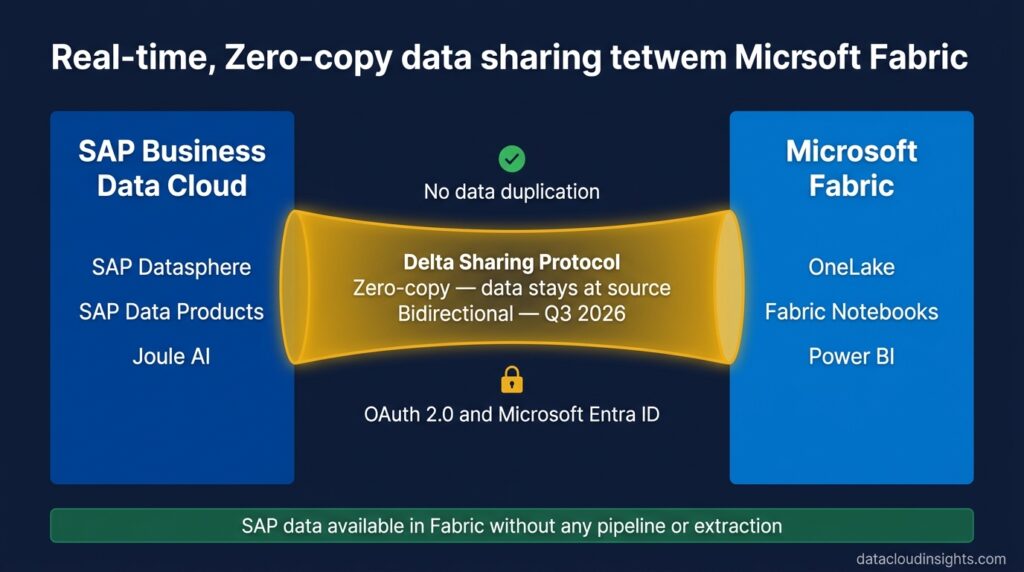
The data sharing announcement reached general availability in Q3 2026 — enabling bidirectional zero-copy Delta Sharing between SAP Business Data Cloud and Microsoft OneLake — eliminating data replication entirely.
Let us be precise about what this means technically because the marketing language can obscure the engineering reality.
SAP to Microsoft direction:
SAP data products — harmonised, enriched, and governed through SAP Business Data Cloud and SAP Datasphere — land in Microsoft OneLake via Delta Sharing. No extraction pipeline. No ADF copy activity. No data duplicated into ADLS Gen2. The data exists in BDC’s governed layer and Microsoft Fabric reads it in place via the Delta Sharing protocol.
For a data engineer this means a Microsoft Fabric notebook or dataflow can query a Financial Statement Data Product from SAP BDC using standard Spark SQL — without any pipeline having moved that data into your Azure estate. The Fabric workspace sees the SAP Data Product as if it were a native Fabric shortcut to an external Delta table. All the SAP business context — hierarchies, currency logic, organisational structures — is available in the Fabric notebook because the data never lost it during extraction.
Microsoft to SAP direction:
SAP is collaborating closely with Microsoft to make SAP Business Data Cloud Connect for Microsoft Fabric available for customers in the second half of 2026. This will allow bidirectional zero-copy sharing between SAP Business Data Cloud and Microsoft Fabric, significantly simplifying many use cases that previously required moving and managing copies of data.
The bidirectional capability means Microsoft Fabric data products — built from non-SAP data sources like Azure SQL, Cosmos DB, SharePoint, Microsoft Dataverse, or external APIs — can be shared back into SAP BDC’s Data Product catalogue. SAC dashboards can combine SAP financial data with Microsoft CRM data from Dynamics 365. Joule can answer questions that span both SAP and Microsoft data sources.
SAP Datasphere Mirroring for Microsoft Fabric:
Mirroring for SAP Datasphere is generally available since March 2026. This technology integrates SAP Datasphere replication flows into the mirroring capabilities of Microsoft Fabric — allowing seamless integration between SAP’s data integration tools and Microsoft Fabric’s analytical capabilities.
Datasphere Mirroring is an alternative path to the BDC Connect zero-copy approach. Where BDC Connect shares Data Products via Delta Sharing without moving data — Datasphere Mirroring replicates Datasphere tables into Microsoft Fabric’s OneLake storage. The data exists in both places. This trades the zero-copy advantage for faster Fabric query performance on SAP data — useful for heavy analytical workloads in Fabric that need Fabric-native storage performance.
The architectural choice between BDC Connect zero-copy and Datasphere Mirroring for Fabric:
Use BDC Connect zero-copy when data freshness is critical, data volumes are large, and you want to avoid duplicating data across platforms. The Fabric workload queries SAP data at source with minimal latency overhead.
Use Datasphere Mirroring when Fabric query performance on SAP data is the primary concern, when the Fabric workload runs heavy aggregations on large SAP datasets, and when the slight lag of replication is acceptable for your use case.
Both are valid. Most large implementations use both — zero-copy for operational reporting where freshness matters, mirroring for heavy analytical and ML workloads in Fabric where performance matters.
Layer 2 — Azure Data Lake Storage Gen2 and SAP BDC
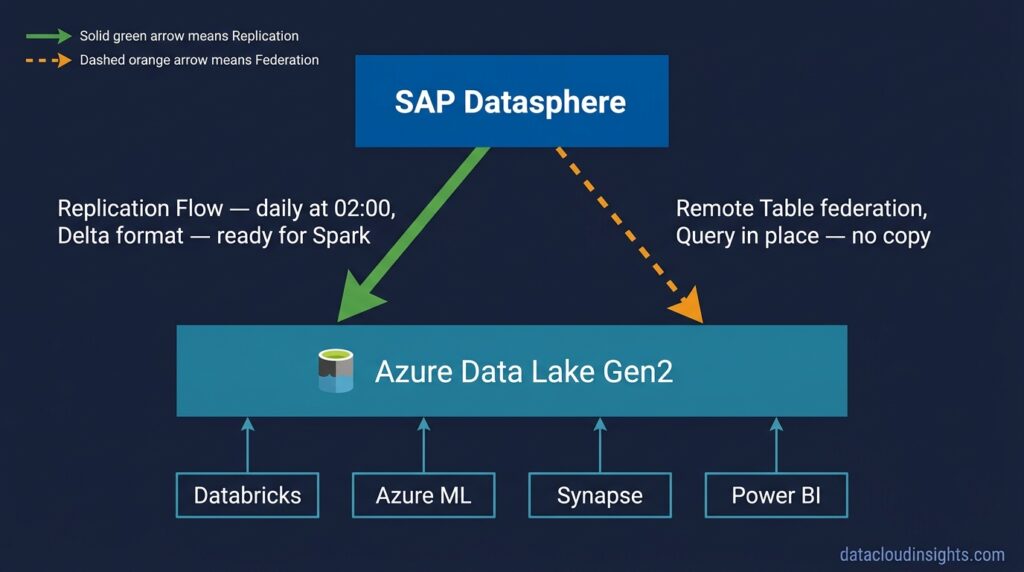
Before the Microsoft Fabric integration existed — and for organisations that have significant investment in ADLS Gen2-centric architectures that predate Fabric — the integration between SAP BDC and Azure Data Lake is through SAP Datasphere’s federation and replication capabilities.
Reading Azure Data Lake data into BDC:
SAP Datasphere supports connectivity to ADLS Gen2 as an external data source. The connection uses Azure service principal authentication — a Microsoft Entra ID application registration with appropriate ADLS Gen2 permissions that Datasphere uses to authenticate against your Azure storage account.
Once the connection is established Datasphere can create Remote Tables pointing to Parquet, Delta, or CSV files in ADLS Gen2 containers. These Remote Tables appear in Datasphere’s modelling environment alongside SAP-native tables. A Datasphere View can join an SAP General Ledger Remote Table with a Parquet file from ADLS Gen2 containing e-commerce transaction data — combining the two sources in a single governed model without moving either.
Real-time data federation allows for immediate access to business data without the need for physical data movement. SAP BDC natively integrates and can connect directly to external cloud lakes, supporting multi-cloud and cross-platform analytics.
Writing SAP BDC data to Azure Data Lake:
Data from SAP sources can be replicated to Azure Data Lake Storage Gen2 via SAP Datasphere through its Replication Flow feature.
Replication Flows in Datasphere allow you to configure scheduled or triggered replication of SAP data into ADLS Gen2. The replication writes data in Delta format — making it immediately consumable by Databricks, Synapse Analytics, and any other tool in your Azure estate that reads Delta.
This is the pattern for organisations that have existing Delta Lake gold layers in ADLS Gen2 and want to add SAP data to them without changing their existing consumption architecture. SAP financial data replicates daily into ADLS Gen2 in Delta format. Your existing Databricks gold layer jobs pick it up and join it with existing data. Your existing Power BI datasets on top of the gold layer now include SAP actuals without any changes to the reporting layer.
Layer 3 — Microsoft Entra ID: The identity backbone
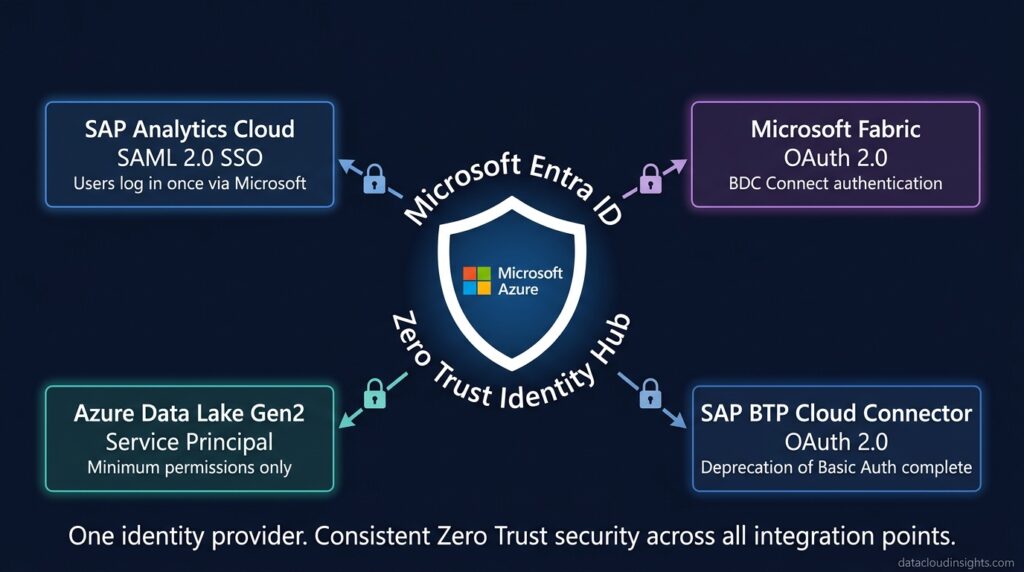
Every enterprise integration conversation eventually becomes an identity conversation. SAP BDC and Azure is no exception.
With the deprecation of Basic Authentication, SAP systems now integrate with Exchange Online using OAuth 2.0 and Microsoft Entra ID for modern authentication. The outcome is a modern secure integration layer for SAP aligned with Zero Trust principles and ready for AI-driven and API-based enterprise architectures.
Microsoft Entra ID — formerly Azure Active Directory — is the identity provider that underpins the security model for SAP and Azure integration in 2026. Understanding how it fits into the BDC integration architecture prevents the authentication failures and permission issues that delay most SAP and Azure integration projects.
For BDC Connect and Fabric integration:
The authentication between SAP BDC and Microsoft Fabric uses OAuth 2.0 with Microsoft Entra ID as the identity provider. When a Fabric workspace requests access to an SAP Data Product via Delta Sharing — the request authenticates through an Entra ID service principal that has been granted permission in BDC’s access governance layer. The mTLS plus OAuth dual-layer security model from Part 3 applies here too — Entra ID issues the OAuth token, mTLS verifies the connection identity.
For ADLS Gen2 connections from Datasphere:
When Datasphere connects to ADLS Gen2 as an external data source — it authenticates using an Azure service principal. You create a Microsoft Entra ID application registration, grant it Storage Blob Data Reader access on the ADLS Gen2 storage account, and provide the client ID and client secret to Datasphere’s connection configuration.
The service principal approach follows Zero Trust principles — Datasphere has the minimum permissions needed to read the specific ADLS Gen2 containers it needs, nothing more. When the data engineer who set up the connection leaves the company, the service principal is rotated without disrupting the connection — because it is not tied to a named user’s credentials.
For RISE with SAP on Azure — Entra ID SSO:
If your organisation runs RISE with SAP on Azure — your SAP systems run in SAP’s managed Azure subscription adjacent to your own Azure tenant. Single Sign-On between your Azure tenant’s Entra ID and the SAP systems uses SAML 2.0 federation. Business users who are already authenticated to Microsoft 365 can access SAC dashboards and BDC-powered applications without a separate SAP login.
This SSO configuration is one of the first identity tasks on any RISE with SAP on Azure project and one of the highest-value quick wins for user adoption. A business user who has to log in separately to SAP and Microsoft 365 uses the SAP system less. A business user who accesses SAC through their Microsoft SSO uses it every day.
Layer 4 — Azure Machine Learning and BDC
The Azure Machine Learning integration pattern with SAP BDC follows the same principles as the Databricks integration from Part 3 — but with Azure ML as the compute layer instead of Databricks Spark.
SAP Data Products flow from BDC into ADLS Gen2 via Datasphere Replication Flows — or are read directly from BDC via the ADLS Gen2 Remote Table connection. Azure ML training jobs read the data from ADLS Gen2 using Azure ML datasets or directly via the storage SDK. ML model outputs are written back to ADLS Gen2 as Parquet or Delta files. Datasphere picks them up via a Remote Table and publishes them as a Customer Data Product back in BDC.
The practical difference between this pattern and the Databricks pattern is tooling. Azure ML uses MLflow for experiment tracking — which is also natively supported in Databricks. If your organisation uses both Azure ML and Databricks, the MLflow compatibility means model lineage is consistent across both compute environments.
One important architectural note — Azure ML and Databricks are not competitors in the SAP BDC context. Azure ML excels at model training pipelines with strong CI/CD integration and managed compute scaling. Databricks excels at large-scale data transformation and feature engineering using Spark. Many enterprise implementations use both — Databricks for feature engineering on large SAP datasets, Azure ML for the training pipeline, with BDC as the governed data source feeding both.
Layer 5 — Joule and Microsoft 365 Copilot: The AI agent integration
Agent-to-agent integration between SAP Joule and Microsoft 365 Copilot was announced at SAP Sapphire 2026. This integration allows Joule agents and Copilot agents to collaborate on tasks that span both SAP and Microsoft data and processes.
This is early-stage in terms of production enterprise deployments but architecturally significant. A Microsoft 365 Copilot agent working in Teams or Outlook can invoke a Joule agent to retrieve SAP financial data — and vice versa. A Joule agent working on a procurement approval can retrieve a supplier’s email history from Microsoft Exchange via a Copilot agent.
The data foundation for this agent-to-agent collaboration is the BDC and Microsoft Fabric zero-copy integration. Joule can only answer questions about SAP data accurately if that data is governed and contextually rich in BDC. Copilot can only retrieve SAP data into Microsoft 365 workflows if BDC Data Products are accessible via the Fabric integration.
The practical advice for data engineers — agent-to-agent integration is not a data engineering problem to solve today. It is an architecture decision to account for in your BDC and Fabric integration design. Specifically — the Data Products you design and publish today are the data foundation that Joule agents will query when agent-to-agent integration becomes production-ready in your organisation. Design them with AI readability in mind as covered in Part 4.
The RetailCo Azure integration architecture
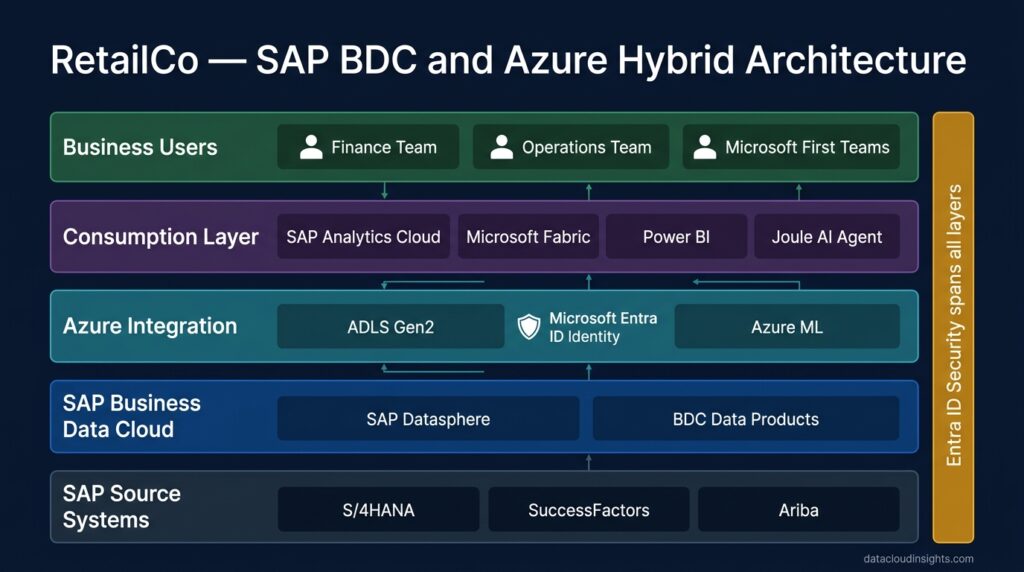
Marie’s final architecture document for RetailCo’s BDC and Azure integration had five layers. Here is what she built.
Identity layer — Microsoft Entra ID as single identity provider
All authentication between BDC and Azure services flows through Entra ID. The ADLS Gen2 connection from Datasphere uses a dedicated service principal with Storage Blob Data Reader on the specific containers BDC needs. The Microsoft Fabric connection uses OAuth via Entra ID. SAC SSO for RetailCo users authenticates through Entra ID using SAML federation. One identity platform. Consistent Zero Trust security model across all integration points.
Data ingestion layer — Datasphere Replication Flows to ADLS Gen2
SAP S/4HANA financial and sales data replicates daily into RetailCo’s ADLS Gen2 in Delta format via Datasphere Replication Flows. The replication runs at 02:00 CET to be complete before the morning reporting window. The Delta files land in a dedicated SAP zone in ADLS Gen2 with access controlled by the service principal — separate from RetailCo’s existing Azure data zones. Existing Databricks gold layer jobs read from this SAP zone alongside existing Azure data sources.
Federation layer — Remote Tables for non-critical data
RetailCo’s e-commerce platform data in ADLS Gen2 is federated into Datasphere as Remote Tables — not replicated. The e-commerce data changes constantly throughout the day. Replication would be stale. Federation allows Datasphere to query the current state of e-commerce data when needed for SAC reporting — with acceptable query latency for the non-operational reporting use cases that consume it.
Fabric integration — zero-copy for Microsoft workloads
When RetailCo’s Microsoft Fabric team needs SAP financial data for their Fabric-native analytical workloads — they access it via BDC Connect zero-copy integration. No data moves into Fabric’s OneLake. SAP Data Products are accessible in Fabric workspaces via Delta Sharing. The Fabric Power BI reports that the Microsoft-first teams prefer can include SAP actuals without an extraction pipeline.
Write-back layer — Azure ML outputs to BDC
RetailCo’s demand forecasting models run in Azure ML. Training data comes from the SAP Inventory Data Product via ADLS Gen2 replication plus external market signals from Azure. Model outputs write to ADLS Gen2 in Delta format. A Datasphere Remote Table reads those outputs. Marie’s team publishes them as a Demand Forecast Customer Data Product in BDC. SAC Planning uses the forecast as the AI-generated budget baseline.
Five layers. Each one using the right integration pattern for the specific use case. No data duplicated unnecessarily. Consistent identity model throughout.
The honest timeline — what is available now versus coming
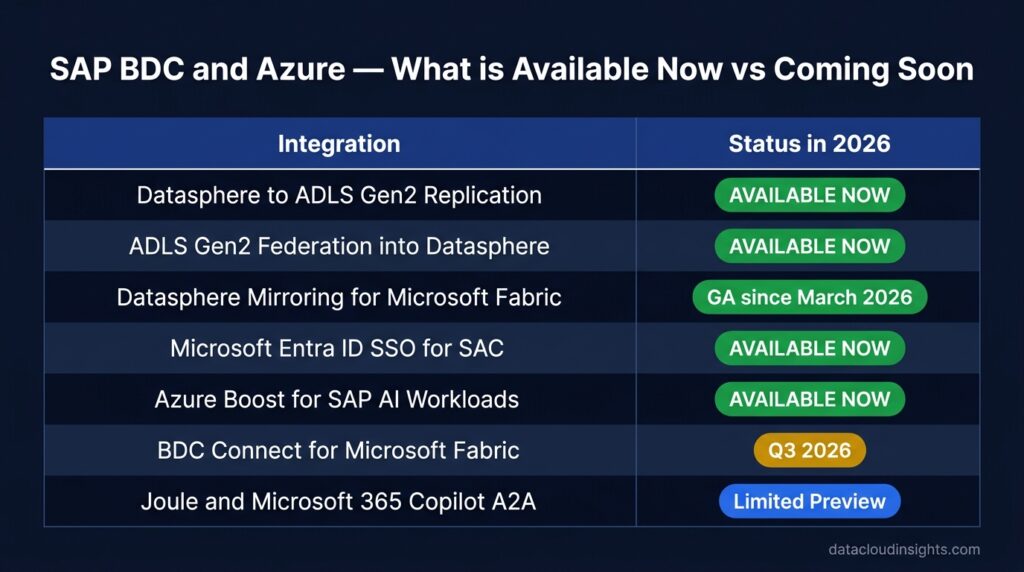
One of the most important things a data engineer can do when designing a BDC and Azure architecture in 2026 is understand what is generally available today versus what is on the roadmap.
| Integration | Status | Available |
|---|---|---|
| Datasphere to ADLS Gen2 replication | ✅ GA | Now |
| ADLS Gen2 federation into Datasphere | ✅ GA | Now |
| Datasphere Mirroring for Fabric | ✅ GA | Since March 2026 |
| BDC Connect for Microsoft Fabric | 🟡 Q3 2026 | H2 2026 |
| Joule to Microsoft 365 Copilot A2A | 🔵 Preview | Limited availability |
| Azure Boost for SAP AI workloads | ✅ GA | Now |
| Microsoft Entra ID SSO for SAC | ✅ GA | Now |
| Microsoft Sentinel for SAP BTP | ✅ GA | Now |
The practical implication — if your project goes live before Q3 2026 and you need Microsoft Fabric integration, use Datasphere Mirroring which is already GA. Design your architecture so that BDC Connect for Fabric can replace or augment Mirroring when it becomes available without requiring a major redesign. The two approaches are complementary not competing — building for an easy transition now saves significant rework later.
Three architecture patterns — and when to use each
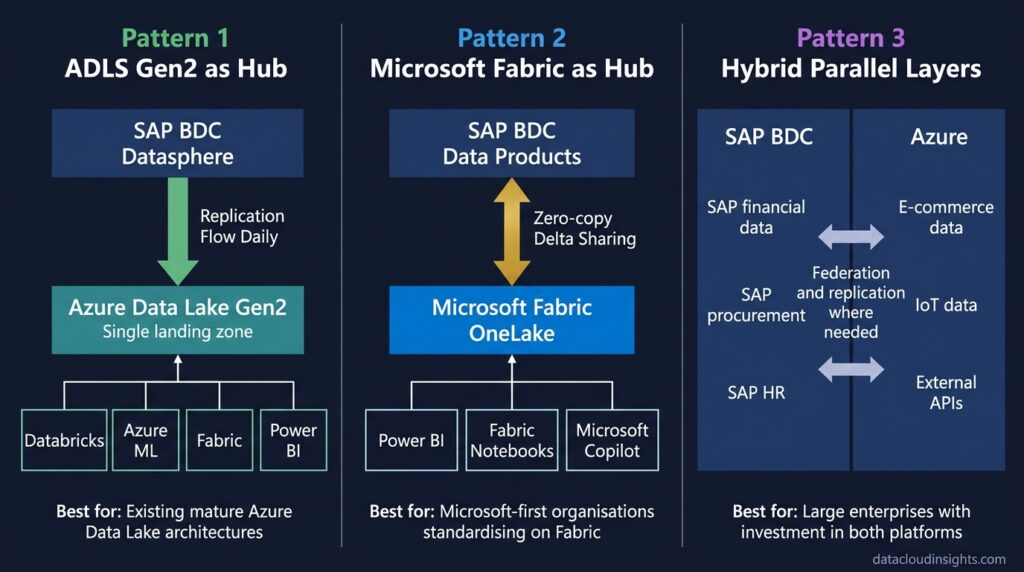
Pattern 1 — ADLS Gen2 as the integration hub
SAP data replicates from BDC Datasphere into ADLS Gen2 in Delta format. All Azure tools — Databricks, Azure ML, Synapse, Fabric, Power BI — consume from ADLS Gen2. BDC does not need direct connections to each Azure tool individually. ADLS Gen2 is the single landing zone for SAP data in the Azure estate.
This is the right pattern when you have an existing mature Azure Data Lake architecture that predates BDC. You are adding SAP data to an existing platform rather than redesigning around BDC. The integration point is minimal — one Datasphere Replication Flow into an existing ADLS Gen2 zone.
Pattern 2 — Microsoft Fabric as the integration hub
BDC Data Products are shared directly into Microsoft Fabric OneLake via zero-copy BDC Connect. Microsoft Fabric becomes the unified analytical platform — consuming SAP data from BDC directly alongside Microsoft-native data from Dynamics 365, SharePoint, and Azure SQL. Power BI reports, Fabric notebooks, and Copilot agents all access SAP data through Fabric.
This is the right pattern for organisations that are standardising on Microsoft Fabric as their analytical platform and want to minimise data movement and pipeline complexity. It requires BDC Connect for Fabric which reaches GA in Q3 2026.
Pattern 3 — Hybrid — BDC and Azure as parallel governed layers
Some data stays in BDC’s governed layer and is accessed via federation or zero-copy sharing. Some data replicates to ADLS Gen2 for Azure-native consumption. The boundary between the two is defined by use case — SAP-origin data with critical business context stays in BDC. Non-SAP data and ML outputs flow through Azure. BDC and Azure are peers rather than one being subordinate to the other.
This is the most common pattern for large enterprises with significant existing investment in both SAP and Azure. It requires the most careful architecture design — clear boundaries, consistent identity model, explicit ownership of each data domain — but it leverages the strengths of both platforms without forcing either to do things it was not designed for.
RetailCo used Pattern 3. SAP financial, procurement, and HR data governed in BDC. E-commerce, IoT, and external data governed in Azure. ML workloads in Azure consuming from both. SAC and Fabric as parallel consumption layers serving different user communities.
What Part 6 covers
Part 5 gave you the complete SAP BDC and Azure integration picture — Microsoft Fabric zero-copy sharing, ADLS Gen2 patterns, Microsoft Entra ID identity design, Azure ML integration, the honest availability timeline, and three architecture patterns with guidance on when to use each.
Part 6 asks the question that every organisation faces when BDC arrives on the agenda — how does BDC compare to what we already have? When should we migrate? When should we keep the existing stack? How do we make the decision without getting captured by vendor marketing from either side?
The complete BDC for Data Engineers series:
- Part 1 — What is SAP Business Data Cloud and why should data engineers care? (published)
- Part 2 — SAP BDC Architecture — the data engineer’s translation guide (published)
- Part 3 — SAP BDC and Databricks — partners not competitors (published)
- Part 4 — SAP BDC Data Products — design, governance and engineering decisions (published)
- Part 5 — SAP BDC and Azure — the complete integration guide (you are here)
- Part 6 — SAP BDC vs your current stack — honest migration considerations (soon)
- Part 7 — SAP BDC governance and security — for engineers who care about data quality
- Part 8 — SAP BDC certification guide — C_BCBDC for data engineers
Subscribe below to get notified when Part 6 publishes.
Related reading on Data Cloud Insights
- SAP Business Data Cloud for Data Engineers — Part 1
- SAP BDC Architecture Explained
- SAP BDC and Databricks Integration
- SAP BDC Data Products Design
- SAP BDC Architecture with Real Examples
Published by the Data Cloud Insights team — SAP data professionals with hands-on implementation experience across Europe, bridging modern cloud data engineering and the SAP BDC ecosystem.