
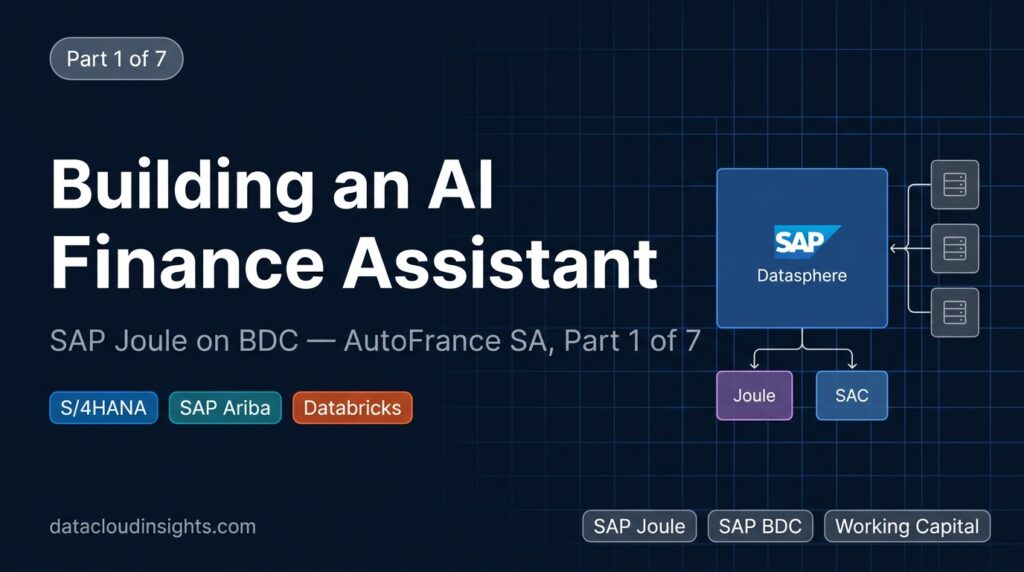

Part 1 of 7 — Joule on SAP Business Data Cloud: An End-to-End Project at AutoFrance SA
This series documents a complete implementation of SAP Joule on SAP Business Data Cloud, from the initial business case through to production go-live. Every technical decision is explained. Every architectural trade-off is documented. The SQL views, the Datasphere configuration, the Joule skill definition — all of it is here.
The company is AutoFrance SA, a fictive French automotive parts manufacturer. The problem is real: finance teams at large manufacturers routinely spend 30 to 40 percent of analyst capacity answering data retrieval questions that should not require an analyst at all. The solution — a governed semantic layer in SAP Datasphere feeding SAP Joule — is real and replicable.
If you are a data architect evaluating SAP BDC, a consultant preparing a client proposal, or a finance technology team trying to understand what Joule actually needs underneath it to work correctly, this series is written for you.
AutoFrance SA: The Company
AutoFrance SA is a tier-1 automotive supplier headquartered in Paris. Annual revenue of approximately €8.2 billion. Four manufacturing plants across France:
| Plant code | Location | Primary product |
|---|---|---|
| NORD | Valenciennes | Powertrain assembly |
| SUD | Bordeaux | Chassis and suspension |
| EST | Strasbourg | Electrical systems and wiring |
| IDF | Poissy | Body panels and exterior finishing |
The finance organisation has a central team in Paris reporting to the CFO, plus one plant controller at each of the four sites. The group uses SAP S/4HANA as its ERP system, SAP Ariba for procurement, and Databricks on Azure for demand forecasting and inventory optimisation models. SAP Analytics Cloud has been in place since 2021 for management reporting.
This is a standard large-enterprise SAP landscape. If your client or your company has a similar footprint, this project is directly applicable.
The Problem That Triggered the Project
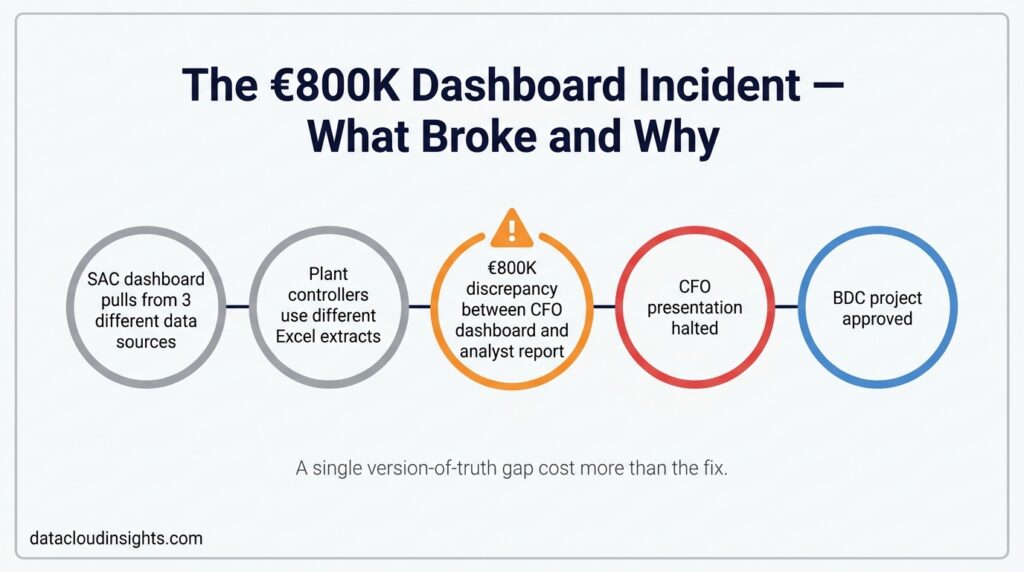
In October 2023, the AutoFrance CFO received a free cash flow report for Q3 that showed a €14 million shortfall versus plan at plant EST. The report came from a SAC dashboard that the analytics team had built 18 months earlier. The CFO asked the analytics team to explain the shortfall.
The investigation took 11 days. The root cause turned out to be a combination of three things: a supplier payment term shortening that had been agreed in Ariba but had not been reflected in the S/4HANA payment run configuration, an inventory build-up at EST driven by a Databricks forecast revision that nobody had connected to the finance view, and an AR collection delay from one customer that had slipped past the standard DSO monitoring.
None of these three things were individually visible from the SAC dashboard. The dashboard showed the output — the €14 million gap — but not the components. Getting to the components required an analyst pulling data from three separate systems, reconciling supplier IDs that did not match between Ariba and S/4HANA, and spending 11 days on work that should have taken an afternoon.
The total cost of that investigation, including analyst time and the delayed management decision: approximately €800,000 when you include the working capital cost of the actions that were not taken while the investigation was running.
The CFO approved the BDC project two weeks later.
Why BDC and Not a Different Approach
The analytics team evaluated three options before proposing BDC.
Option 1: Build more SAC stories. The existing SAC environment could theoretically support more granular drill-through. The problem: SAC stories at AutoFrance SA were built on hard-coded data blends specific to each story. Adding drill-through to the Q3 FCF story would not help with the next unexpected question, which would come from a different direction. The team was building dashboards for questions they had already thought of. The CFO was asking questions they had not.
Option 2: Build a data warehouse on Azure. Databricks was already in place. Building a financial data mart on Azure Databricks was technically feasible. The problem: it would create a second copy of S/4HANA data outside the SAP governance perimeter, require custom connectors to Ariba, and produce a system that SAP would not support or maintain. Every upgrade to S/4HANA would potentially break the extraction layer.
Option 3: SAP Business Data Cloud with Datasphere and Joule. BDC provides a governed semantic layer — SAP Datasphere — that sits inside the SAP ecosystem, connects natively to S/4HANA via SLT replication, connects to Ariba via a managed connector, and connects to Databricks via BDC Connect Delta Sharing. SAP Joule queries that semantic layer directly using the metadata and annotations you define. SAC, which was already in place, can read from the same semantic layer without any changes to existing dashboards.
The decisive argument for Option 3 was this: the CFO did not need more dashboards. She needed to be able to ask questions the team had not anticipated. A governed semantic layer that a natural language interface can query is the only architecture that scales to unanticipated questions.
The BDC Architecture at AutoFrance SA
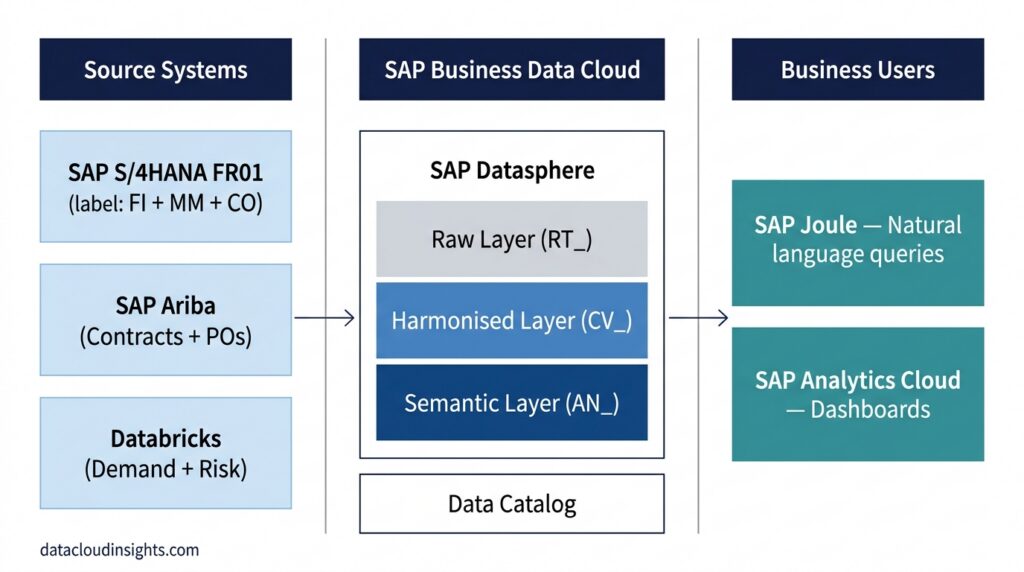
Three source systems feed one Datasphere space, which feeds two output layers:
Sources:
- SAP S/4HANA (FI and MM modules) — company code FR01, four plants, 40 million BSEG rows, replicated via SAP Landscape Transformation Replication Server in near real time
- SAP Ariba — supplier contracts, purchase orders, payment terms, replicated hourly via the BDC managed Ariba connector
- Databricks on Azure — demand forecasting models and inventory risk scores, connected via BDC Connect Delta Sharing (zero-copy, no ETL pipeline)
Inside Datasphere (space: AUTOFRANCE_FINANCE):
Three layers. Raw layer (RT_ prefix) — source tables as they arrive, never exposed to users. Harmonised layer (CV_ prefix) — calculation views that clean, join, and standardise. Semantic layer (AN_ prefix) — analytical datasets that Joule and SAC consume.
Outputs:
- SAP Joule — natural language queries from CFO and plant controllers
- SAP Analytics Cloud — existing dashboards, unchanged, now reading from the governed semantic layer instead of ad-hoc data blends
The single most important architectural decision: one Datasphere space for all four plants, not four separate spaces. We considered a space per plant, which would have given cleaner access isolation. We rejected it because the CFO-level questions — comparing plants, rolling up to company level — would have required cross-space joins, which add complexity and latency. Row-level data access controls inside a single space handle plant-level security cleanly.
The Supplier ID Problem: Why This Project Was Harder Than It Looked
When AutoFrance SA implemented SAP Ariba in 2019, the procurement team issued internal vendor codes in the format V-XXXXX. The S/4HANA vendor master, in place since 2017, used SAP standard vendor numbers in the format LIF-XXXXX. Nobody connected them at the data level. The procurement team maintained a matching spreadsheet.
When we first joined the Ariba and S/4HANA supplier data, 119 of 340 active suppliers — representing €2.1 billion in annual spend — were unmatched. A finance system that cannot link procurement contracts to financial postings for 34 percent of spend cannot give Joule correct answers to working capital questions. This was the first thing we fixed, before writing a single calculation view.
The fix: a canonical SUPPLIER_MAPPING table inside Datasphere, with a new SM-XXXXX identifier linking every Ariba V-XXXXX code to its corresponding S/4HANA LIF-XXXXX vendor number. Three-pass population: VAT number auto-match, normalised name fuzzy match, manual validation for the remainder. Full detail in Part 3.
The Financial Case for the Project
The CFO needed numbers before approving the budget.
Annual analyst cost for routine data retrieval: The four-person analytics team spent an estimated 30 percent of their time on questions that were, at root, data lookups: “what was AP at plant NORD last month,” “which suppliers are past due,” “how does DSO compare to last quarter.” At an average fully-loaded cost of €75,000 per analyst, that is €90,000 per analyst per year, or €360,000 across the team.
Working capital cost of delayed decisions: The Q3 2023 incident cost €800,000. The analytics team estimated one significant delayed-decision incident per year as a conservative baseline.
Total annual cost of the status quo: approximately €1.16 million.
BDC project cost: data engineering resources for eight weeks plus BDC subscription. For AutoFrance SA, BDC was already included in the enterprise SAP agreement, so the incremental cost was the engineering engagement: approximately €140,000.
Payback period: under 18 months at the conservative estimate. Under six months if the working capital improvements from better payment term visibility were included.
The CFO approved. The project started in January 2024.
The Project Timeline
The implementation ran eight weeks:
Weeks 1 and 2: Discovery. Data landscape mapping, source system access setup, data quality assessment, business question inventory with the CFO and plant controllers.
Weeks 3 and 4: Connections. SLT replication configuration for FI and MM tables, Ariba managed connector setup, BDC Connect Delta Sharing subscription from Databricks.
Weeks 5 and 6: Data modelling. Harmonised calculation views, semantic layer analytical datasets, KPI annotations, supplier reconciliation.
Week 7: Joule configuration. Skill definition, knowledge context, question scope, user group assignment, row-level access controls.
Week 8: Accuracy testing and go-live. 40-question test suite, two rounds of fixes, production enablement for 11 users.
What This Series Covers
Each part of this series covers one phase of the project in full technical detail:
Part 2 — Connecting the three sources: SLT replication configuration for BSEG and EKKO, the Ariba connector setup, BDC Connect Delta Sharing from Databricks, and why we chose these methods over the alternatives we evaluated.
Part 3 — Building the data model: all six calculation views with full SQL, the supplier reconciliation logic, the 14-KPI semantic layer dataset, and the annotation quality difference that determines whether Joule answers correctly or hedges.
Part 4 — Configuring Joule: the skill definition field by field, the 4,200-character knowledge context document, dataset priority configuration, and row-level access for plant controllers versus the CFO.
Part 5 — Accuracy testing: the 40-question test design, round-by-round results (62%, 79%, 91%), every failure mode explained with its root cause and fix.
Part 6 — Go-live: real Joule query transcripts from the first four weeks, the supplier payment anomaly Joule surfaced before the finance team detected it, and the four issues production found that testing missed.
Part 7 — Results and the internal pitch: measured outcomes, €2.8 million working capital improvement, and a six-slide proposal structure for pitching this project internally.
Related Reading on DataCloudInsights
The complete Building an AI-Powered Finance Assistant with SAP Joule on BDC series:
- Part 1 – Building an AI-Powered Finance Assistant with SAP Joule on BDC
- Part 2 – SAP Datasphere: Connecting S/4HANA, Ariba, and Databricks
- Part 3 – SAP Datasphere: Building the Calculation Views and Semantic Layer That Make Joule Accurate
Published by the Data Cloud Insights team — SAP data professionals with hands-on BDC and Joule implementation experience across enterprise clients in Europe.


Pingback: SAP Datasphere: Connecting S/4HANA, Ariba, and Databricks - Data Cloud Insights PART 2 — Connecting the Three Sources
Pingback: SAP Datasphere: Building the Calculation Views and Semantic Layer That Make Joule Accurate - Data Cloud Insights PART 3 SAP Joule Building the Harmonised and Semantic Layers