
Every week someone in a project meeting says SAP Datasphere and SAP Business Data Cloud interchangeably. Then someone else corrects them. Then a third person says actually they are the same thing now. Then everyone looks at the architect.
If you have been in that meeting, this post is for you.
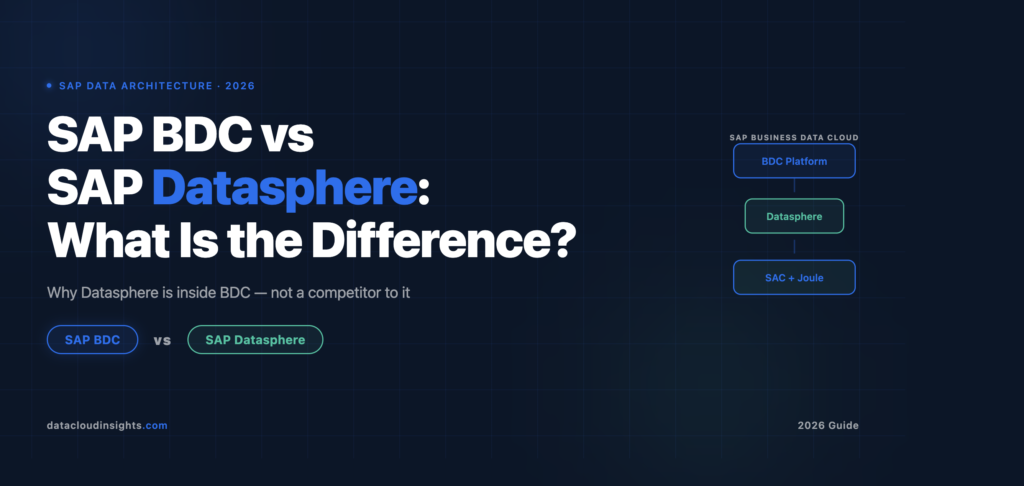
SAP BDC and SAP Datasphere are not the same product. They are not competing products. They are not interchangeable terms. Understanding the relationship between them is one of the most important things you can get clear on before starting any modern SAP analytics or AI project in 2026.
Here is the honest explanation that nobody on the vendor side will give you quite this directly.
Why This Confusion Exists in the First Place
SAP Business Data Cloud is not an incremental update to SAP Datasphere. It is a full architectural consolidation. BDC merges SAP Datasphere, SAP Analytics Cloud, and SAP’s curated business content library into a single governed data platform designed specifically to power enterprise AI.
That sentence is the source of all the confusion. SAP Datasphere still exists. SAP Analytics Cloud still exists. But they are now components inside a larger platform called SAP Business Data Cloud, not standalone products in the way they used to be.
The analogy that makes this click immediately: think of Microsoft 365. Word still exists. Excel still exists. Teams still exists. But they are all part of Microsoft 365 as a unified bundle with shared identity, shared licencing, and shared governance. You do not say “I use Word” and “I use Microsoft 365” as if they are alternatives. One is the component. The other is the platform.
SAP Datasphere is Word. SAP Business Data Cloud is Microsoft 365. The component still does what it always did, but the platform gives it broader context, commercial packaging, and deeper integration with everything else.
What SAP Datasphere Actually Does
SAP Datasphere is the data federation, integration, and governance engine. It handles data movement, replication, and transformation across SAP and non-SAP systems. It provides the semantic business layer, which is the understanding of what customer, vendor, cost centre, and purchase order mean in your specific enterprise.
In practical terms Datasphere is where your data gets organised, cleaned, modelled, and governed before anything consumes it. You connect your SAP S/4HANA system to Datasphere. You connect your Azure Data Lake. You connect your Databricks Delta Lake tables. Inside Datasphere you define remote tables that federate data from those sources without moving it. You build views with transformation logic. You create analytic models with dimensions, measures, and hierarchies that business users and AI tools can consume.
The key capability that makes Datasphere genuinely different from a standard data warehouse or Delta Lake is that it understands SAP business semantics natively. It knows what a profit centre is. It knows what a fiscal year variant means. It knows how cost centre hierarchies work in S/4HANA. You do not teach it these things. It comes with them.
On every project where I have helped clients connect SAP data to analytics tools like Power BI or Databricks before Datasphere existed, the team spent weeks rebuilding business context that SAP already had. Profit centre hierarchies reconstructed in dbt. Currency conversion logic rewritten in Python. Fiscal year calendars rebuilt in custom tables. Datasphere eliminates most of that reconstruction work.
What SAP Business Data Cloud Adds on Top
SAP Business Data Cloud is not a replacement for Datasphere. It is the packaged bundle that sits on top of Datasphere and adds three things that standalone Datasphere did not have.
SAP Delivered Business Content. BDC ships with pre-built data products for standard SAP business processes including Financial Accounting, Procurement, HR Headcount, Supply Chain, and Asset Management. These arrive pre-connected to your S/4HANA system and pre-structured for analytics consumption. You do not build them. You install them and start using them.
On a recent project that moved from standalone Datasphere to BDC, the financial reporting data product that the finance team had spent six weeks building in Datasphere was replaced by the SAP delivered Financial Statement data product in two days. Same result. A fraction of the build time.
Unified Licencing and Commercial Packaging. Standalone Datasphere and standalone SAC had separate licences, separate contracts, and separate renewal cycles. BDC packages them together with the business content in one commercial agreement. For large enterprises managing SAP licences this simplifies procurement significantly.
BDC Connect for Hyperscalers. BDC Connect is a cloud service that enables secure, bidirectional, zero-copy data sharing between SAP Datasphere and supported external systems using the Delta Sharing protocol. Organisations can share data products without moving or duplicating data, preserving governance and business context while providing real-time access.
BDC Connect for Databricks is already generally available. Microsoft Fabric integration is targeted for Q3 2026. Snowflake and BigQuery follow. These hyperscaler integrations exist within the BDC platform and require BDC licencing. They are not available in standalone Datasphere.
The Architecture in Plain Language
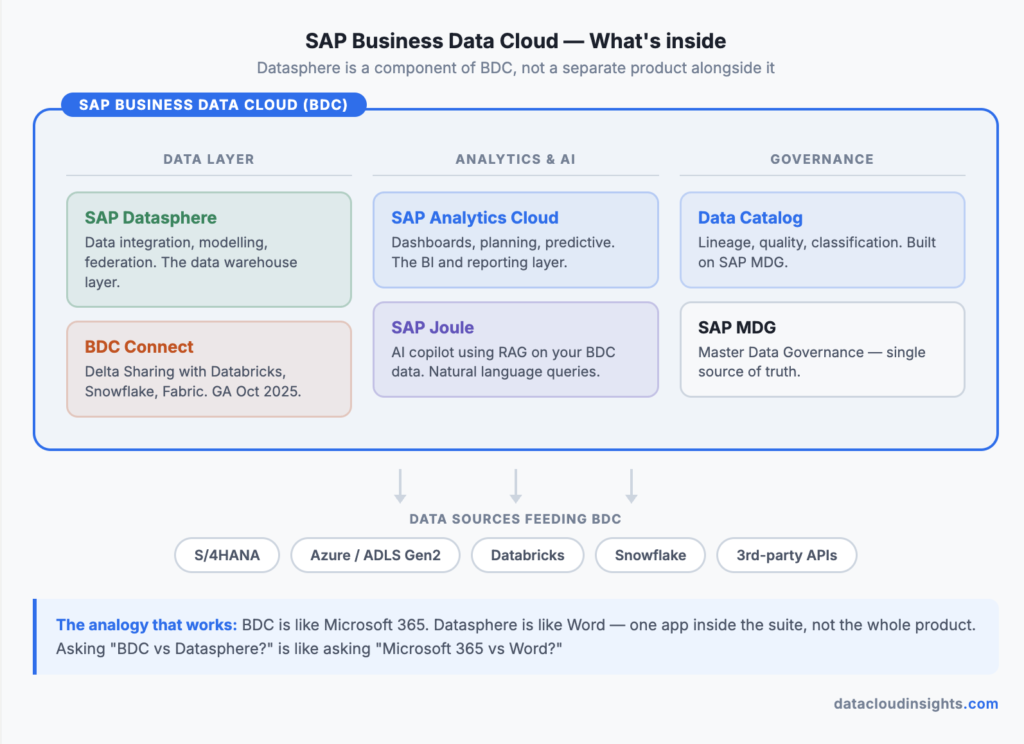
If you draw the BDC architecture as a stack, it looks like this from bottom to top.
Your source systems sit at the bottom: SAP S/4HANA, SAP SuccessFactors, SAP Ariba, SAP BW, Azure Data Lake, Databricks, external APIs.
SAP Datasphere sits in the middle as the governed data layer. Data from source systems flows into Datasphere through native connections for SAP sources and through federation or replication for external sources. Datasphere applies transformation logic, governance rules, and semantic definitions. SAP delivered data products live here. Custom data products you build also live here.
SAP Analytics Cloud sits on top as the consumption layer: dashboards, planning models, AI assisted forecasting, all consuming from Datasphere’s governed semantic layer underneath.
The entire stack is what SAP calls SAP Business Data Cloud.
If you already have SAP Analytics Cloud and SAP Datasphere deployed, you are not starting from zero. Your existing investment becomes the foundation of your BDC environment.
When Would You Use Datasphere Standalone vs BDC?
This is the practical question that matters most on real projects and the one that vendor presentations rarely answer honestly.
Datasphere standalone still makes sense when your organisation needs only the data integration and semantic modelling capabilities, not the full BDC business content library and not the hyperscaler integration through BDC Connect. Some organisations already have SAC deployed separately and are not yet ready for a commercial migration to BDC packaging. Datasphere standalone remains a supported product and works well in this scenario.
BDC makes sense when you are starting a new SAP analytics or AI programme and want to begin from the most current architecture. When you want to use SAP delivered data products to accelerate delivery rather than building everything custom. When you are planning to use Joule AI capabilities on SAP data and need the governed data foundation those capabilities require. When you want zero-copy integration with Databricks, Microsoft Fabric, or Snowflake without building custom extraction pipelines.
The honest summary: if you are starting fresh in 2026, start with BDC. If you have existing Datasphere investment, plan your migration timeline with SAP and move at a pace that makes sense for your organisation.
The Configuration Question Nobody Asks Early Enough
When Datasphere is integrated into SAP BDC versus used standalone, there are configuration differences in the SAP Cloud Connector, SAP Datasphere, and Azure Data Lake setup. This matters practically because it affects how your existing Cloud Connector configurations, SLT replication setups, and Azure Data Lake connections work after the commercial migration to BDC. The connections themselves do not break, but the administration interface, the tenant structure, and some configuration parameters change.
Before any commercial migration from standalone Datasphere to BDC, document every existing connection configuration in detail. Connection names, authentication methods, source system details, replication flow schedules, monitoring alerts. The migration is technically smooth for most organisations, but the teams who struggle are those who did not document what they had before starting.
Common Mistakes I See on Projects
Treating BDC and Datasphere as competitors. They are not. Choosing BDC does not mean abandoning Datasphere. Datasphere is inside BDC doing the same job it always did.
Assuming standalone Datasphere will be discontinued soon. SAP has not announced an end of life date for standalone Datasphere. Organisations with existing deployments have time to plan a thoughtful migration rather than rushing.
Building extensive custom data products in standalone Datasphere before checking BDC content. Check the SAP delivered BDC data products first. If a data product already exists for your business process, use it. Building a custom version of something SAP ships is several weeks of work you do not need to do.
Migrating commercially to BDC before the technical team is ready. The commercial migration to BDC can happen faster than the technical readiness to use BDC’s capabilities. Make sure your Datasphere administrators understand the BDC specific configuration changes before the migration date.
Assuming Joule works out of the box without data quality work. The garbage in, garbage out principle remains absolute in the AI era. Joule consuming data through BDC is only as good as the data governance underneath it.
Key Takeaways
- SAP Datasphere is the data integration, federation, and semantic modelling engine. It is the core technical layer.
- SAP Business Data Cloud is the platform that packages Datasphere, SAP Analytics Cloud, SAP delivered business content, and hyperscaler integrations into one commercial offering.
- BDC does not replace Datasphere. Datasphere is inside BDC doing the same job with additional capabilities unlocked by the BDC context.
- Standalone Datasphere remains supported for existing customers who are not yet ready for the commercial migration to BDC.
- If you are starting a new analytics or AI programme in 2026 and want SAP delivered data products plus Joule readiness, start with BDC from day one.
- Document your existing Datasphere configuration thoroughly before any commercial migration to BDC.
Related Reading on DataCloudInsights
- SAP Business Data Cloud for Data Engineers — Complete Guide
- SAP BDC Architecture Explained with Real Examples
- SAP BDC Data Products — Design and Governance
- SAP Analytics Cloud Complete Beginner’s Guide
Published by the Data Cloud Insights team — SAP data professionals with hands-on BDC and Datasphere implementation experience across enterprise clients in Europe.

Pingback: SAP Joule AI and SAP Business Data Cloud: Why Your Data Must Be Ready Before Your AI Is - Data Cloud Insights SAP Joule AI and BDC: Why Your Data Must Be Ready First (2026)
Pingback: Building an AI-Powered Finance Assistant with SAP Joule on BDC: AutoFrance SA, Part 1 - Data Cloud Insights The Business Case and Architecture SAP JOULE