
Part 2 of 7 — Joule on SAP Business Data Cloud: An End-to-End Project at AutoFrance SA
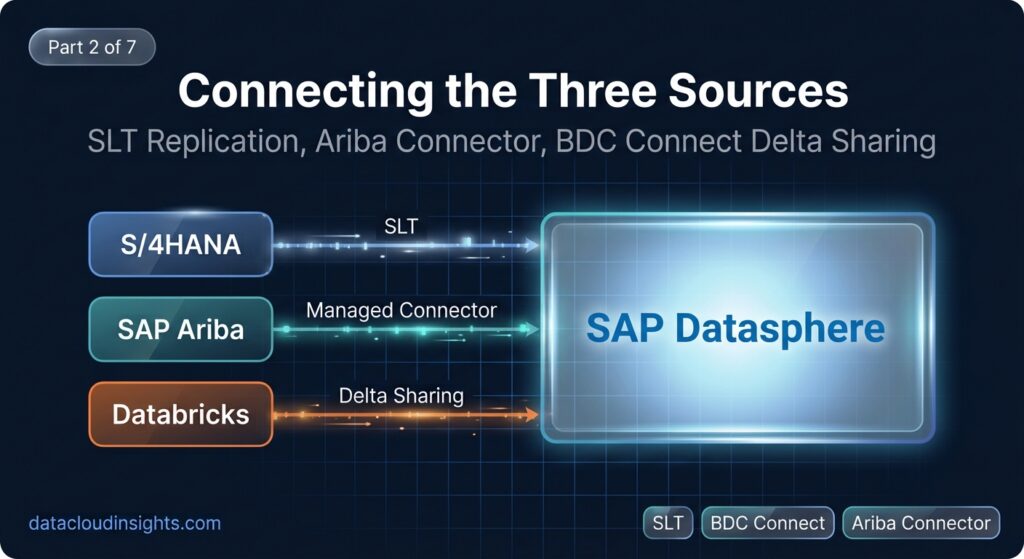
Part 1 established what we were building and why. This part covers how the data gets in. Three source systems, three different connection methods, three different sets of decisions about what to replicate and how.
The space we are building into is AUTOFRANCE_FINANCE inside SAP Datasphere on BDC. Everything in this part happens before a single calculation view is written — we need the raw tables landing correctly before we can model on top of them.
Connection 1: SAP S/4HANA via SLT Replication
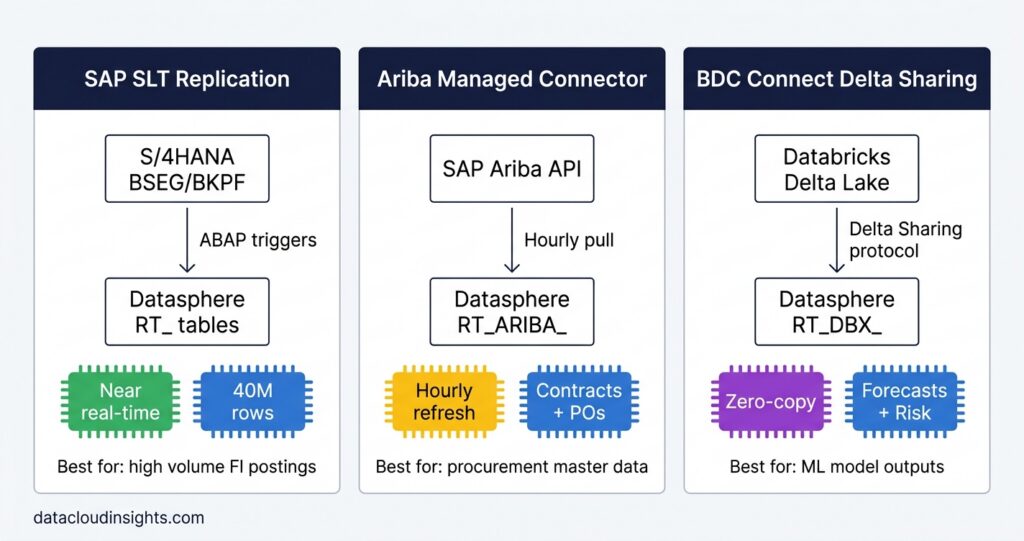
SAP Landscape Transformation Replication Server is an ABAP-based replication engine that sits on the S/4HANA system (or on a dedicated ABAP server) and uses database triggers to capture every INSERT, UPDATE, and DELETE on selected tables, streaming them to the target in near real time.
We chose SLT over the alternatives for two reasons. First, AutoFrance SA’s S/4HANA system already had SLT licensed and partially configured for a previous data warehouse project. The infrastructure cost was zero. Second, BSEG — the FI line items table at 40 million rows — needs near real-time replication because the CFO and plant controllers want AP aging figures that reflect the morning’s payment run, not yesterday’s. SLT achieves sub-minute latency on delta changes. A nightly extract would not meet the requirement.
We did evaluate OData v4 as an alternative. SAP S/4HANA exposes most FI data via OData APIs. The problem: OData works well for transactional data with low volume, but running an OData extraction of 40 million BSEG rows in a reasonable time window requires careful parallelisation and introduces complexity the team did not want to maintain. SLT was the right tool for high-volume FI table replication.
Tables replicated via SLT:
| S/4HANA table | Datasphere remote table | Replication mode | Description |
|---|---|---|---|
| BKPF | RT_S4_BKPF | Real-time delta | FI document headers |
| BSEG | RT_S4_BSEG | Real-time delta | FI document line items |
| LFA1 | RT_S4_LFA1 | Daily full | Vendor master general |
| LFB1 | RT_S4_LFB1 | Daily full | Vendor master company code |
| EKKO | RT_S4_EKKO | Real-time delta | Purchase order headers |
| EKPO | RT_S4_EKPO | Real-time delta | Purchase order line items |
| MARD | RT_S4_MARD | Hourly snapshot | Material stock per storage location |
| CSKS | RT_S4_CSKS | Daily full | Cost centre master |
| T001 | RT_S4_T001 | Static | Company code reference |
| T052 | RT_S4_T052 | Static | Payment terms reference |
The MARD replication mode deserves explanation. MARD does not have a clean delta change log the way BSEG does — stock quantities are updated by inventory movements that write to MSEG, and reconstructing the current MARD state from MSEG deltas is complex. We chose hourly snapshot replication instead: SLT takes a full snapshot of MARD every hour and overwrites the remote table. For a 50,000-row table this is fast and simple. For BSEG at 40 million rows it would be impractical, which is why BSEG uses real-time delta.
SLT configuration steps in Datasphere:
In the Datasphere Data Integration monitor:
Space Settings → Connections → Create Connection → SAP ABAP
Fill in the S/4HANA host, ABAP system ID, client number, and the SLT replication server details. The connection type is ABAP, not HANA direct — this routes through SLT, not a direct database connection.
Once the ABAP connection is saved, navigate to:
Data Builder → Import Remote Tables → Select ABAP connection
Select the tables from the list above. For each table, set the Replication Mode (Real-time, Scheduled, or None) in the table’s properties panel after import.
The one configuration issue we hit: BSEG in S/4HANA is a cluster table in older releases. In S/4HANA 2020 and later it is a transparent table, but SLT still requires the BSEG split view (BSEG_ADD, BSEG_EXT) to be enabled on the S/4HANA side. Our basis team needed to activate these split views before SLT replication of BSEG would work. If you hit an SLT error saying BSEG cannot be replicated, this is almost certainly the issue — check the S/4HANA basis configuration first.
Connection 2: SAP Ariba via BDC Managed Connector
The Ariba connection uses a managed connector that SAP provides as part of BDC. Unlike SLT, you do not configure a custom integration — you activate the connector, provide the Ariba realm details and credentials, and SAP handles the extraction logic via the Ariba Procurement Analytics API.
Prerequisites on the Ariba side:
- Ariba realm must have the Procurement Analytics API enabled (not on by default — requires a service request to Ariba support)
- An Ariba integration user with the Analytics API role
- The realm name and data centre region (US, EU, etc.)
Connector setup in BDC Cockpit:
BDC Cockpit → Data Products → Managed Connectors → SAP Ariba
Enter the realm name, data centre, client ID, and client secret from the Ariba integration user. Set the extraction frequency — we chose hourly for contracts and purchase orders, which matches the business requirement for same-day visibility on new POs.
The managed connector creates remote tables in Datasphere automatically. The tables we used:
| Ariba data | Datasphere remote table | Update frequency |
|---|---|---|
| Supplier contracts | RT_ARIBA_CONTRACT | Hourly |
| Purchase orders | RT_ARIBA_PO | Hourly |
| Payment terms history | RT_ARIBA_TERMS_HISTORY | Hourly |
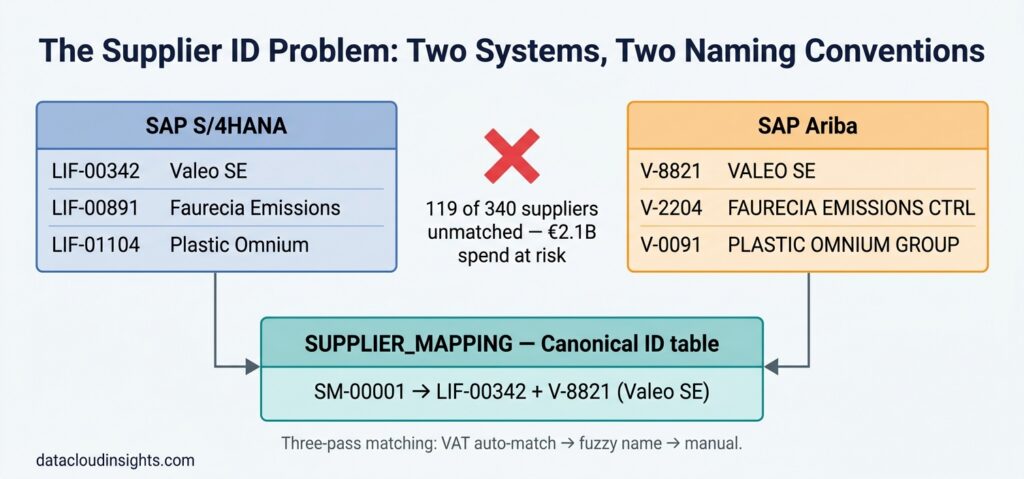
The key field in RT_ARIBA_CONTRACT is ARIBA_SUPPLIER_ID — the V-XXXXX code. This is the field that does not match S/4HANA’s LIFNR. That mismatch is resolved in the SUPPLIER_MAPPING table covered in Part 3.
One thing to know about the Ariba connector: it pulls data via API, so it is subject to Ariba API rate limits. The hourly extraction for AutoFrance SA’s 340 suppliers and approximately 2,400 active purchase orders ran comfortably within the limits. If you have significantly larger volumes — tens of thousands of suppliers, hundreds of thousands of POs — test the extraction time carefully before committing to hourly frequency.
Connection 3: Databricks via BDC Connect Delta Sharing
This is the most architecturally interesting connection of the three. BDC Connect uses the open Delta Sharing protocol, which means Databricks does not push data to Datasphere — instead, Datasphere subscribes to data shares that Databricks publishes, and reads them directly from the Databricks Delta Lake with zero data movement.
The zero-copy model:
Delta Sharing works on a provider-recipient model. Databricks (the provider) creates a share — a named collection of Delta tables — and publishes it with an activation link. Datasphere (the recipient) uses that activation link to subscribe. When Datasphere queries the remote table, it reads directly from the Databricks Delta Lake via presigned URLs. No ETL pipeline. No intermediate storage. No data duplication.
This was a significant selling point for the AutoFrance data science team. The Databricks environment contains proprietary demand forecasting models that the data science team was understandably protective of. With Delta Sharing, the forecast output tables are shared into Datasphere without giving the data engineering team any access to the underlying model notebooks or raw training data. The data science team controls exactly what is in the share.
Setup on the Databricks side:
python
# In a Databricks notebook, run as the Delta Sharing admin:

# Create the share
spark.sql("CREATE SHARE autofrance_bdc_share")

# Add the forecast output table to the share
spark.sql("""
    ALTER SHARE autofrance_bdc_share
    ADD TABLE demand_forecasting.forecast_outputs.monthly_demand_forecast
    AS autofrance_demand_monthly
""")

# Add the inventory risk table
spark.sql("""
    ALTER SHARE autofrance_bdc_share
    ADD TABLE demand_forecasting.inventory_risk.risk_scores
    AS autofrance_inventory_risk
""")

# Create a recipient for Datasphere
spark.sql("""
    CREATE RECIPIENT autofrance_datasphere
    COMMENT 'SAP Datasphere BDC Connect recipient'
""")

# Get the activation link (send this to the Datasphere admin)
spark.sql("DESCRIBE RECIPIENT autofrance_datasphere").show(truncate=False)
The activation link from the last command is a one-time URL. Once used in Datasphere to activate the subscription, it expires.
Setup on the Datasphere side:
Data Builder → Connections → Create Connection → BDC Connect (Delta Sharing)
Paste the activation link. Datasphere validates it against the Databricks share and creates remote tables for each shared table.
The two tables we received:
| Databricks share table | Datasphere remote table | Update frequency |
|---|---|---|
| autofrance_demand_monthly | RT_DBX_DEMAND_MONTHLY | Monthly (model run cycle) |
| autofrance_inventory_risk | RT_DBX_INVENTORY_RISK | Weekly (risk recalculation) |
RT_DBX_DEMAND_MONTHLY contains: MATNR (material number), WERKS (plant), YEAR_MONTH (YYYYMM), FORECAST_QTY, FORECAST_VALUE_EUR.
RT_DBX_INVENTORY_RISK contains: MATNR, WERKS, RISK_SCORE (0 to 100), UPDATED_AT.
Why We Did Not Use OData for S/4HANA
We evaluated three methods for the S/4HANA connection: SLT (what we chose), OData v4, and a direct HANA database connection. The direct HANA connection was rejected immediately — it requires network-level access to the S/4HANA database host, which the security team would not approve for a cloud-hosted Datasphere environment.
OData was more seriously evaluated. SAP S/4HANA exposes financial data via standard OData services — /sap/opu/odata/sap/API_JOURNALENTRYITEMBASIC_SRV for journal entry items, for example. The appeal is that OData is stateless and does not require any ABAP-side configuration beyond activating the service.
We rejected OData for BSEG specifically because of volume. The journal entry item OData service for FR01 would need to return 40 million records in the initial load. OData pagination at $top=5000 would require 8,000 API calls. Even with parallelisation, this takes hours and puts significant load on the S/4HANA application server. SLT handles the initial load more efficiently by reading directly at the database layer.
OData remains a reasonable choice for lower-volume tables — we could have used it for LFA1 (vendor master, around 5,000 records) without any performance concern. We used SLT for everything to keep the connection architecture consistent and reduce the number of integration patterns to maintain.
The Raw Table Naming Convention
Every remote table in AUTOFRANCE_FINANCE follows the RT_ prefix convention:
- RT_S4_ — S/4HANA via SLT
- RT_ARIBA_ — Ariba via managed connector
- RT_DBX_ — Databricks via BDC Connect
This naming convention exists for one reason: when a data engineer or a Joule administrator looks at the space, they can immediately tell where every table comes from without having to check the connection properties. In a space that will eventually have 20 to 30 remote tables, this matters.
Data Validation Before Moving to Modelling
Before writing the first calculation view, we ran four validation checks on every remote table:
- Row count check against source: BSEG row count in Datasphere versus BSEG row count in S/4HANA for company code FR01. Within 0.01% is acceptable — the small gap is from in-flight transactions during the comparison window.
- Key field null check: LIFNR null rate in RT_S4_BSEG for vendor line items. Any null LIFNR on a vendor posting indicates a data quality issue upstream.
- Date range check: Earliest and latest BUDAT in RT_S4_BKPF. Confirmed we had data back to January 2022, covering the 24-month window we needed.
- Ariba-to-S4 supplier match preliminary rate: Before building SUPPLIER_MAPPING, we ran the VAT number join as a diagnostic. Result: 186 of 340 suppliers matched automatically. This told us the reconciliation effort was significant but manageable.
All four checks passed at acceptable thresholds. We moved to modelling.
Related Reading on DataCloudInsights
The complete Building an AI-Powered Finance Assistant with SAP Joule on BDC series:
- Part 1 – Building an AI-Powered Finance Assistant with SAP Joule on BDC
- Part 2 – SAP Datasphere: Connecting S/4HANA, Ariba, and Databricks
- Part 3 – SAP Datasphere: Building the Calculation Views and Semantic Layer That Make Joule Accurate
Published by the Data Cloud Insights team — SAP data professionals with hands-on BDC and Joule implementation experience across enterprise clients in Europe.



Pingback: Building an AI-Powered Finance Assistant with SAP Joule on BDC - Data Cloud Insights The Business Case and Architecture SAP JOULE
Pingback: SAP Datasphere: Building the Calculation Views and Semantic Layer That Make Joule Accurate - Data Cloud Insights PART 3 SAP Joule Building the Harmonised and Semantic Layers