
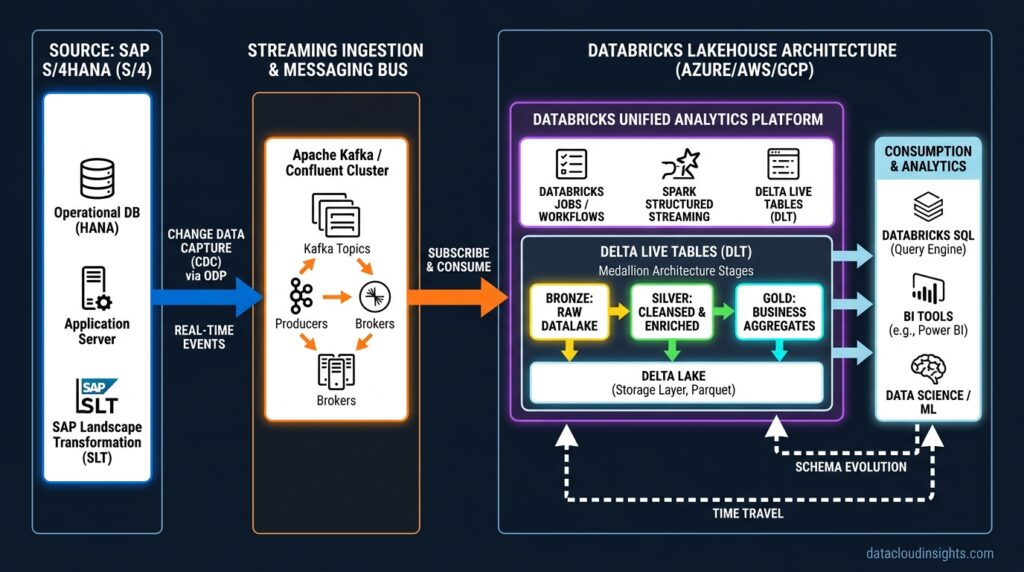

Executive Summary: Combining SAP Business Data Cloud (BDC) with Databricks unlocks enterprise-scale AI, advanced analytics, and cross-domain reporting. In this guide, we walk through building a production-ready, automated PySpark ingestion pipeline to stream SAP BDC entities directly into a Databricks Medallion Architecture (Bronze –> Silver –> Gold) using PySpark and Delta Lake.
Introduction
As enterprises modernize their data stacks, bridging operational data silos remains a top architectural priority. SAP Business Data Cloud (BDC), built on SAP Datasphere and SAP BTP, serves as the backbone for core enterprise ERP processes (Finance, Supply Chain, Sales). However, training advanced Machine Learning models or performing massive cross-platform analytics often requires the unified processing engine of Databricks Delta Lake.
Ingesting SAP data into cloud lakehouses has historically been complex due to intricate SAP schemas, proprietary business logic, and security constraints.
In this tutorial, we will build a production-grade ingestion pipeline using PySpark and Delta Lake to ingest SAP BDC data into Databricks smoothly and securely.
Architectural Overview
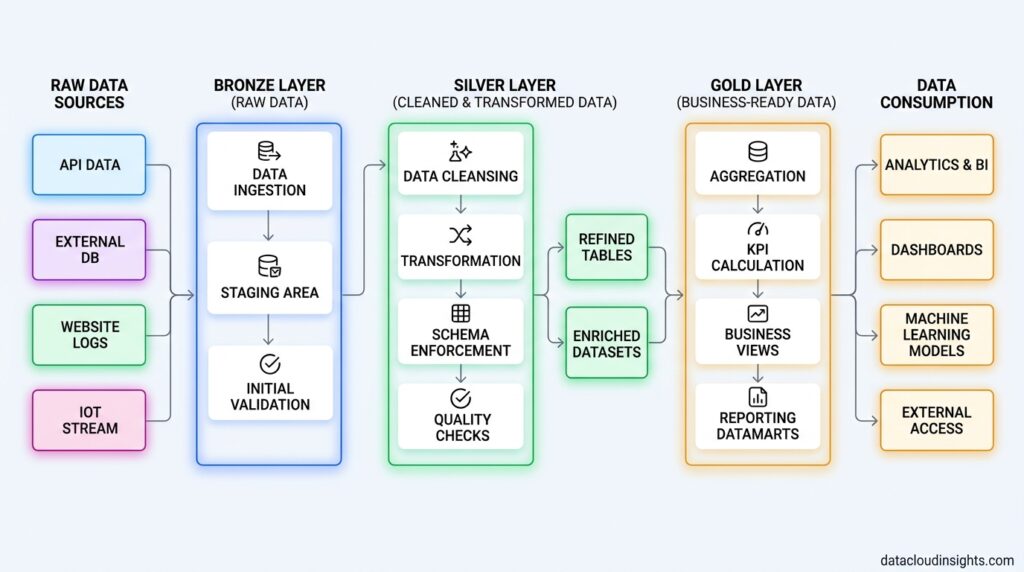
A robust SAP BDC to Databricks integration follows a multi-stage data lakehouse pattern:
- Source: SAP BDC (exposing data via OData v4 / Replication Flows / REST APIs).
- Ingestion Layer: Databricks Notebooks or Jobs running PySpark to fetch payload using secure OAuth 2.0 authentication.
- Bronze Layer (Raw): Append-only raw JSON/Parquet landing zone preserving original SAP structures.
- Silver Layer (Cleaned & Curated): Deduplicated, schema-enforced relational Delta tables using
MERGE INTO(upsert logic). - Gold Layer (Aggregated): Business metrics optimized with Z-Ordering for BI and ML consumption.
Prerequisites & Setup
Before running the ingestion pipeline, ensure you have:
- Databricks Workspace: Runtime 12.2 LTS or higher with access to Unity Catalog.
- SAP BDC Credentials: OAuth 2.0 Client ID, Client Secret, and Token Endpoint URL.
- Databricks Secrets Scope: Store sensitive SAP credentials securely instead of hardcoding them in notebooks.
Create your secret scope via Databricks CLI:
--bash
databricks secrets create-scope --scope sap-scope
databricks secrets put --scope sap-scope --key client-id
databricks secrets put --scope sap-scope --key client-secret
Step-by-Step Implementation Guide
Step 1: Authenticate with SAP BDC via OAuth 2.0
SAP BDC REST and OData APIs require short-lived Bearer tokens for authentication. We extract credentials dynamically using dbutils.secrets and fetch an access token.
#python
import requests
import json

# Fetch credentials securely from Databricks Secrets
client_id = dbutils.secrets.get(scope="sap-scope", key="client-id")
client_secret = dbutils.secrets.get(scope="sap-scope", key="client-secret")
token_url = "https://your-sap-bdc-instance.authentication.us10.hana.ondemand.com/oauth/token"

# Request OAuth Token
payload = {
    "grant_type": "client_credentials",
    "client_id": client_id,
    "client_secret": client_secret
}

response = requests.post(token_url, data=payload)
if response.status_code == 200:
    access_token = response.json().get("access_token")
    print("OAuth 2.0 Authentication Successful.")
else:
    raise Exception(f"Failed to authenticate with SAP BDC: {response.text}")
Step 2: Extract SAP Data & Write to Bronze Delta Table
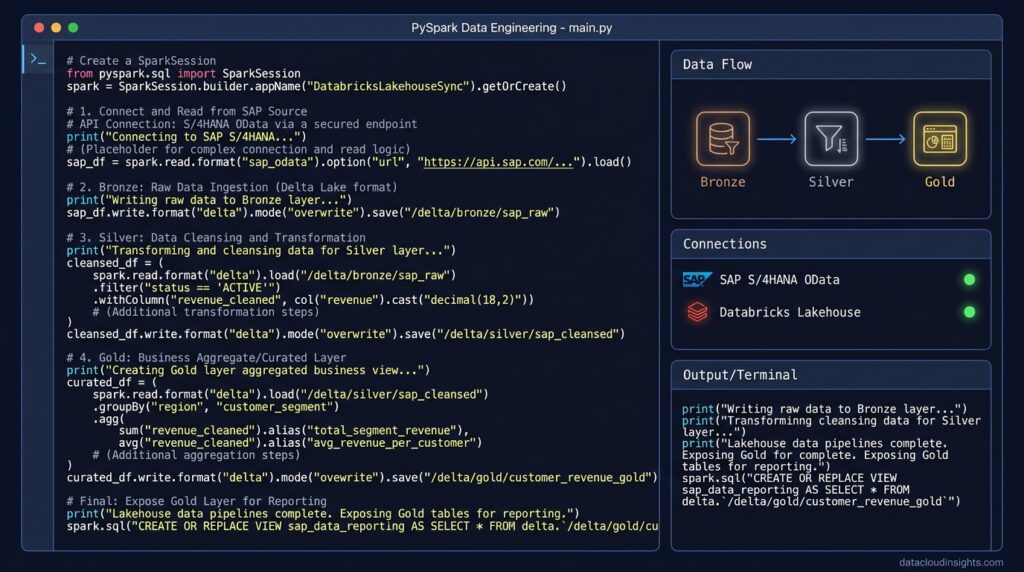
In this step, we pull sales order records from the SAP BDC OData API, parse the JSON payload into a PySpark DataFrame, add ingestion metadata, and save the data into the Bronze Delta table.
#Python
from pyspark.sql import SparkSession
from pyspark.sql.functions import col, current_timestamp, lit

# SAP BDC OData Endpoint
sap_odata_url = "https://your-sap-bdc-api.com/sap/opu/odata/sap/API_SALES_ORDER_SRV/A_SalesOrder?$top=5000&$format=json"

headers = {
    "Authorization": f"Bearer {access_token}",
    "Accept": "application/json"
}

# Execute Request
api_response = requests.get(sap_odata_url, headers=headers)
raw_results = api_response.json()["d"]["results"]

# Convert JSON array to PySpark DataFrame
rdd = spark.sparkContext.parallelize([json.dumps(raw_results)])
df_raw = spark.read.json(rdd)

# Add lineage metadata
df_bronze = df_raw \
    .withColumn("_ingested_at", current_timestamp()) \
    .withColumn("_source_system", lit("SAP_BDC"))

# Append into Bronze Delta Table
df_bronze.write.format("delta") \
    .mode("append") \
    .option("mergeSchema", "true") \
    .saveAsTable("bronze.sap_sales_orders")

print("Successfully written raw payload to bronze.sap_sales_orders.")
Step 3: Clean, Transform & Upsert into Silver Delta Table
Raw SAP data often contains nested structures, string-formatted numbers, and null keys. In the Silver Layer, we enforce column types and perform a Delta Lake MERGE (upsert) to handle incremental updates gracefully.
#Python
from pyspark.sql.types import DoubleType, TimestampType
from delta.tables import DeltaTable

# Read raw bronze records
df_bronze_source = spark.read.table("bronze.sap_sales_orders")

# Schema enforcement and transformation
df_silver_clean = df_bronze_source \
    .select(
        col("SalesOrder").alias("sales_order_id"),
        col("SalesOrderType").alias("order_type"),
        col("CreatedByUser").alias("created_by"),
        col("TotalNetAmount").cast(DoubleType()).alias("total_net_amount"),
        col("TransactionCurrency").alias("currency"),
        col("_ingested_at")
    ) \
    .filter(col("sales_order_id").isNotNull()) \
    .dropDuplicates(["sales_order_id"])

# Load Silver Delta Table for Upsert
silver_table = DeltaTable.forName(spark, "silver.sap_sales_orders")

# Perform MERGE (Upsert)
silver_table.alias("target") \
    .merge(
        df_silver_clean.alias("source"),
        "target.sales_order_id = source.sales_order_id"
    ) \
    .whenMatchedUpdateAll() \
    .whenNotMatchedInsertAll() \
    .execute()

print("Silver Layer Upsert Complete.")
Optimization & Governance Best Practices
1. Performance Tuning with Z-Ordering
To accelerate queries across large tables, run Databricks OPTIMIZE along with ZORDER BY on frequently filtered primary keys:
-- SQL
OPTIMIZE silver.sap_sales_orders
ZORDER BY (sales_order_id, order_type);
2. Auto Loader for File-Based Staging
If your SAP BDC pipeline exports batch extracts (CSV or Parquet) into cloud storage (Azure ADLS Gen2 or AWS S3), use Databricks Auto Loader (cloudFiles) for automatic file discovery and schema evolution:
#Python
df_autoloader = spark.readStream \
    .format("cloudFiles") \
    .option("cloudFiles.format", "json") \
    .option("cloudFiles.schemaLocation", "dbfs:/mnt/sap_landing/_schemas") \
    .load("dbfs:/mnt/sap_landing/sales_orders/")

df_autoloader.writeStream \
    .format("delta") \
    .option("checkpointLocation", "dbfs:/mnt/sap_landing/_checkpoints") \
    .table("bronze.sap_sales_orders")
3. Unity Catalog Governance
Restrict access to sensitive SAP financial data in Databricks using dynamic column masking or row-level filtering:
-- SQL
-- Dynamic column masking for PII/Financials in Unity Catalog
CREATE MASKING FUNCTION mask_amount(amount DOUBLE)
RETURN CASE
  WHEN IS_ACCOUNT_GROUP_MEMBER('finance_admins') THEN amount
  ELSE NULL
END;

ALTER TABLE silver.sap_sales_orders
ALTER COLUMN total_net_amount SET MASK mask_amount;
Common Implementation Mistakes
- Hardcoding OAuth Credentials: Storing secrets inside notebook cells creates major security vulnerabilities. Always use secret management tools.
- Ignoring Schema Drift: SAP updates can add or modify payload fields unexpectedly. Failing to set schema evolution parameters will break downstream jobs.
- Skipping Delta Table Optimization: Forgetting to run table optimization commands causes file fragmentation and slow query speeds over time.
Key Takeaways
- Integration Paths: SAP BDC data can be ingested into Databricks via OData REST endpoints, native SAP Datasphere/BDC federation, or staging object storage (ADLS Gen2 / AWS S3).
- Medallion Architecture: Land raw JSON/Parquet extractions in the Bronze Layer, clean and deduplicate in the Silver Layer, and aggregate for business analytics in the Gold Layer.
- Governance & Security: Secure sensitive enterprise fields (e.g., financial metrics or employee PII) using Databricks Unity Catalog column-level masking and dynamic views.
Conclusion & Next Steps
Integrating SAP BDC with Databricks Delta Lake bridges the gap between core ERP transactional data and modern enterprise AI analytics. By adhering to the Medallion Architecture, leveraging PySpark for schema enforcement, and managing governance via Unity Catalog, you create a resilient pipeline capable of scaling with enterprise demands.
Related Reading on Data Cloud Insights
Expand your knowledge across enterprise platform architectures by exploring these related articles on Data Cloud Insights:
- SAP BDC Architecture Explained
- SAP Analytics Cloud Complete Guide
- SAP BDC Certification Guide C_BCBDC
- SAP Analytics Cloud vs Power BI
- SAP BDC for Data Engineers Series
- SAP Analytics Cloud for Data Engineers Series
Stay tuned for our upcoming articles where we explore advanced data orchestration patterns, performance tuning techniques, and hybrid cloud strategy breakdowns.