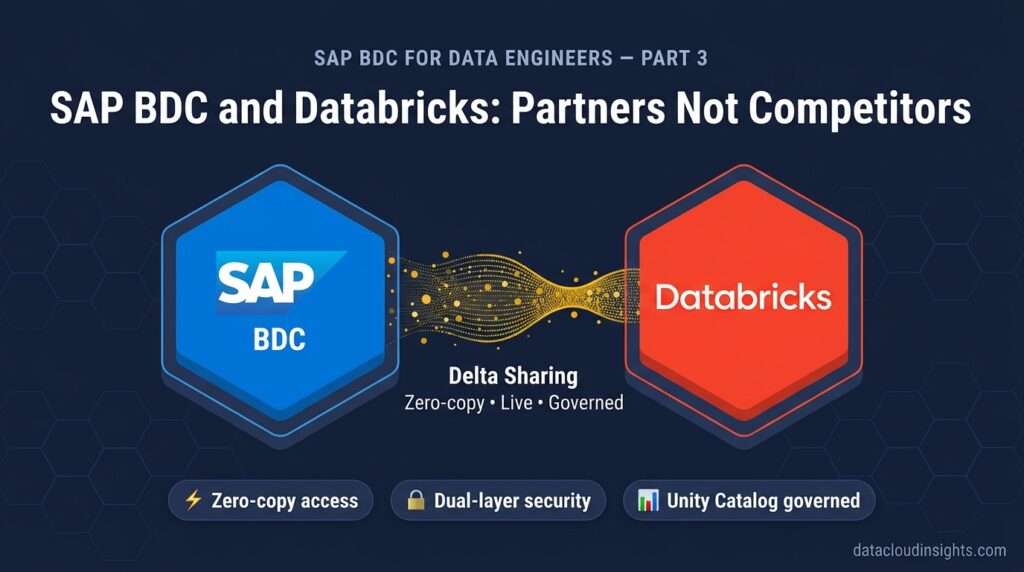

This is Part 3 of our SAP Business Data Cloud for Data Engineers series. In Part 1 we covered what BDC is and why data engineers should care. In Part 2 we mapped the BDC architecture to Azure and Databricks concepts you already know. Now we get into the integration that changes everything for data engineers who live in the Databricks world — BDC Connect for Databricks.
The question every Databricks data engineer asks
You have spent years building on Databricks. Delta Lake. Unity Catalog. MLflow. Apache Spark. You are good at it. Your pipelines run. Your ML models train. Your organisation trusts the data you produce.
Then someone says the company is implementing SAP Business Data Cloud and you need to integrate it with your existing Databricks workspace.
Your first question is always the same. Do I have to rebuild everything?
The short answer — no. The longer answer — this is Part 3.
SAP Business Data Cloud Connect for Databricks is now generally available for customers across all cloud platforms. Organisations can connect their SAP BDC environment to their existing Databricks instance for zero-copy, bidirectional, live data sharing of SAP’s semantically rich and governed Data Products — with no data engineering needed. (Databricks)
That last phrase — with no data engineering needed — deserves some scrutiny. Because it is both accurate and slightly misleading. Let us unpack what it actually means in practice.
What changed — and why it matters
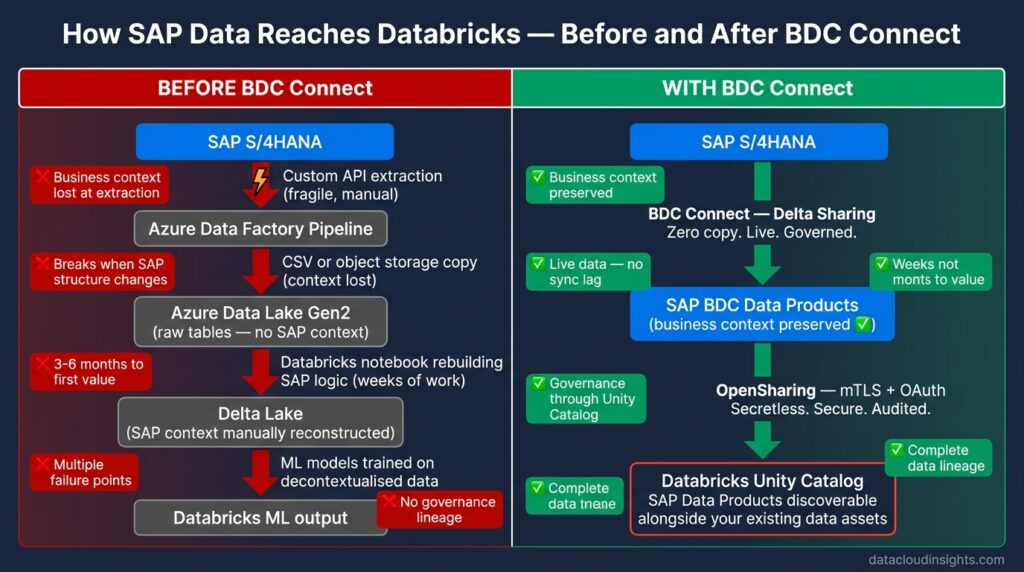
Before BDC Connect existed, connecting SAP data to Databricks was a painful multi-step process that every data engineer who has worked with SAP data knows intimately.
You extracted data from SAP using custom API calls, RFC connections, or file exports. You landed it in Azure Data Lake Storage. You built ADF pipelines to move it. You wrote Databricks notebooks to clean it and rebuild the business context that got lost during extraction. You maintained those pipelines every time SAP’s organisational structure changed. You debugged data quality issues caused by the context loss. You answered questions about why the Databricks revenue figure was different from the SAP revenue figure — usually because someone had rebuilt the currency conversion logic slightly differently.
Until now, customers have relied on fragile replication methods — such as custom API exports, object storage copies, or manual CSV uploads. These introduced data quality risks, governance gaps, and significant engineering overhead. (Databricks)
BDC Connect replaces all of that with a governed, live, zero-copy connection between the two platforms.
SAP and Databricks have introduced a native connector that enables live, zero-copy data sharing between SAP Business Data Cloud and the Databricks Lakehouse. This integration helps organisations accelerate analytics and AI initiatives while preserving business context and governance. (Qubika)
For a data engineer the important words in that sentence are live, zero-copy, and preserving business context. Live means the data you see in Databricks reflects the current state of the SAP system — not the state it was in when your pipeline last ran. Zero-copy means SAP data is not duplicated into your Delta Lake — it is accessed in place from BDC’s governed layer. Preserving business context means the profit centre hierarchy, currency conversions, organisational structures, and financial logic that SAP embeds in its data travel with it into Databricks — you do not rebuild them.
That combination eliminates the three most painful aspects of working with SAP data in a Databricks environment.
The technical foundation — Delta Sharing and OpenSharing
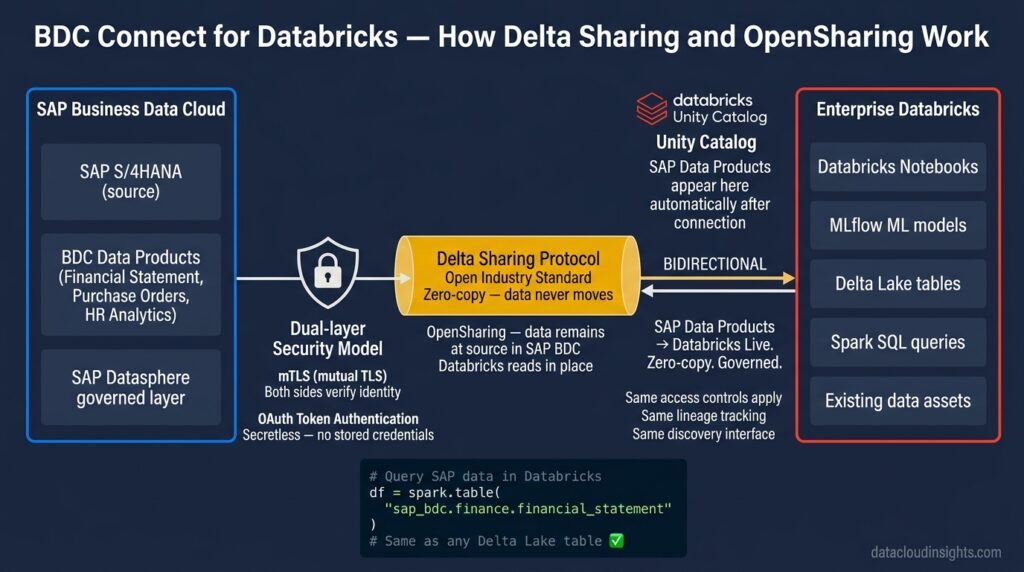
Understanding how BDC Connect actually works technically is important for data engineers who will be asked to implement and maintain it.
Built on Delta Sharing, SAP Business Data Cloud Connect for Databricks leverages the same open protocols for data sharing that power the Databricks ecosystem. SAP Data Products can be shared directly into your existing Databricks instances — live and with full business context from source SAP applications.(Databricks)
Delta Sharing is Databricks’ open protocol for secure data sharing across platforms. If you have used Delta Sharing between Databricks workspaces you already understand the fundamental mechanism. BDC Connect uses the same protocol — it just extends it to work between SAP BDC and Databricks rather than between two Databricks workspaces.
The connector utilises OpenSharing for live, zero-copy access to SAP BDC data products. OpenSharing is a secure data sharing platform that allows you to share data and AI assets. Using OpenSharing, data remains in place and is not moved or replicated. This allows users to combine multiple data sources while maintaining full governance and auditing through Unity Catalog. (Databricks)
The security model is worth understanding because it comes up in every enterprise security review.
The integration is protected by a dual-layer security model — mTLS combined with OAuth — ensuring secure, secretless authentication. (Databricks)
mTLS means mutual Transport Layer Security — both sides of the connection verify each other’s identity before any data exchange happens. OAuth means the authentication uses token-based access rather than stored credentials. Secretless authentication means no passwords or API keys sitting in your Databricks notebooks or Azure Key Vault entries to rotate and manage. From a security operations perspective this is a meaningful improvement over the API key and service principal patterns that most SAP-to-Databricks integrations have historically used.
SAP Business Data Cloud facilitates seamless harmonisation of business data from SAP and non-SAP data from Enterprise Databricks for richer analytics and AI use cases. BDC Connect for Databricks enables bidirectional data sharing of curated data products with Enterprise Databricks leveraging the industry standard open Delta Share protocol, enabling efficient AI and ML workloads. SAP Business Data Cloud also allows direct JDBC connectivity with Enterprise Databricks Delta Lake at the SAP Datasphere layer, enabling an open data ecosystem integration. (Sap)
That JDBC connectivity detail is important and often overlooked in high-level partnership announcements. BDC Connect gives you two integration modes — Delta Sharing for sharing SAP Data Products into Databricks, and JDBC for connecting Datasphere directly to Databricks Delta Lake tables. Different use cases suit different modes and we will cover that distinction in the architecture patterns section below.
Unity Catalog integration — governance that data engineers care about
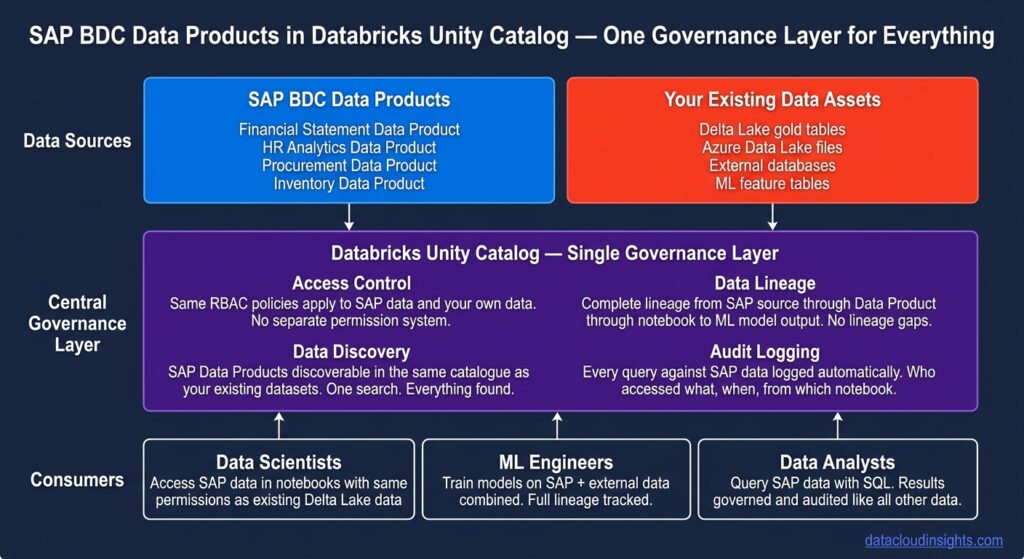
SAP data products from SAP line of business applications can be shared directly with Enterprise Databricks over governed data access, and are discoverable via Unity Catalog. (Sap)
This is the detail that makes BDC Connect genuinely enterprise-grade rather than just a convenient connector.
When SAP Data Products are shared into your Databricks workspace via BDC Connect — they appear in Unity Catalog as governed external tables. Your existing Unity Catalog access controls apply. Your existing data lineage tracking covers them. Your existing audit logging records every access. From a governance perspective, SAP data in your Databricks workspace looks and behaves exactly like any other governed dataset in your Unity Catalog metastore.
For a data engineer this means several practically important things.
Your existing RBAC policies in Unity Catalog extend to SAP data automatically. If a user does not have SELECT permission on the finance schema in Unity Catalog — they cannot query the SAP Financial Statement Data Product either. You do not maintain two separate permission systems.
Your existing data lineage graphs in Unity Catalog include SAP data as sources. When a downstream ML model consumes SAP inventory data, Unity Catalog’s lineage tracking shows the complete path from SAP source through BDC Data Product through Delta Sharing into the Databricks notebook. No lineage gaps.
Your existing data discovery workflows work for SAP data. Data engineers and data scientists in your organisation can discover SAP Data Products through the Unity Catalog interface the same way they discover any other governed dataset. No separate SAP catalogue to maintain.
Marie’s reaction when she saw this in the RetailCo implementation was immediate.
“So the finance team’s SAP data appears in our Unity Catalog alongside our Azure data. Same discovery. Same governance. Same lineage. Same permissions model.”
Exactly.
“And we do not have to build any of that governance ourselves.”
Also exactly.
She was quiet for a moment. Then she said something that every data engineer who has spent time rebuilding SAP governance in custom code will understand.
“I wish this existed two years ago.”
The two Databricks flavours — SAP Databricks vs Enterprise Databricks
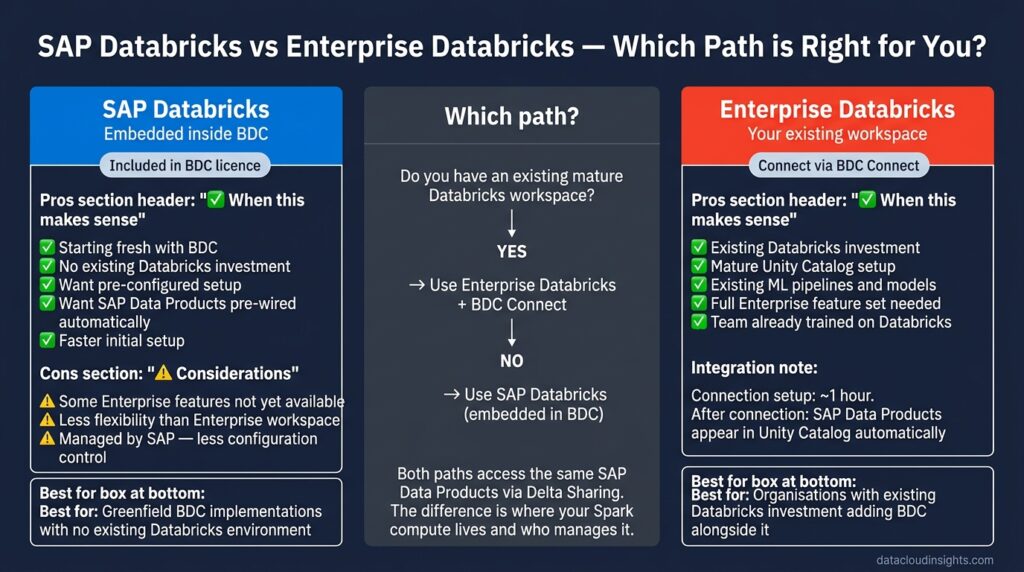
This is the distinction that confuses most people encountering the BDC and Databricks partnership for the first time. There are actually two ways Databricks appears in the BDC context and they are meaningfully different.
SAP and Databricks have teamed up to deliver a unified data platform, bringing cloud data lakehouse capabilities directly into the SAP ecosystem. The centrepiece of this collaboration is SAP Business Data Cloud, which embeds a version of Databricks branded SAP Databricks and provides curated SAP data products out of the box. (Medium)
SAP Databricks is Databricks embedded inside the BDC platform. It is provisioned by SAP as part of the BDC environment. It comes pre-wired to SAP data through the curated Data Products. It is included in the BDC licensing model.
SAP Databricks is provisioned by SAP as part of the BDC environment. It comes pre-wired to SAP data through the curated data products. (Medium)
Enterprise Databricks is your existing Databricks workspace — the one your team has been building on for the past three years. It lives in your Azure subscription or your AWS account. It has your notebooks, your pipelines, your ML models, your Unity Catalog configurations, your existing data assets.
BDC Connect for Enterprise Databricks recently reached general availability. SAP data products from SAP line of business applications can be shared directly with Enterprise Databricks over governed data access and are discoverable via Unity Catalog. Similarly, data from Enterprise Databricks can be shared as Data Products back to SAP Business Data Cloud catalogue via the BDC Python SDK. (Qubika)
The practical question for most data engineering teams is which flavour to use. And the honest answer depends on your starting point.
If your organisation is buying BDC fresh with no existing Databricks investment — SAP Databricks is the natural starting point. It is included in the BDC licence, pre-configured, and requires minimal setup to start consuming SAP Data Products.
If your organisation has an existing mature Databricks environment with years of investment — pipelines, ML models, Unity Catalog configurations, governance policies, data assets — Enterprise Databricks connected via BDC Connect is the right path. You protect your existing investment and extend it with SAP data rather than rebuilding in a new embedded environment.
If your organisation has both — you will likely run both, with clear architectural boundaries between what lives in SAP Databricks versus what lives in your Enterprise workspace. That boundary design is one of the first architecture decisions on any combined BDC and Databricks project.
How to set up BDC Connect — the actual steps
The user who creates the SAP BDC connection becomes its owner. To create a connection, you must first send a Databricks connection identifier to an SAP BDC admin. The SAP BDC admin then uses the connection identifier to generate a connection link on SAP BDC. With the connection link, you finish creating the SAP BDC connection on Databricks. (Databricks)
Here is the complete setup process in plain English:
Prerequisites — before you start:
On the Databricks side you need a workspace enabled for Unity Catalog, the CREATE PROVIDER and CREATE RECIPIENT privileges on your Unity Catalog metastore, and OpenSharing enabled. If you have an enterprise Databricks workspace with Unity Catalog already configured — you likely have all of this already.
On the SAP BDC side you need an SAP BDC admin account with permissions to create external connections and share Data Products.
Step 1 — Get your Databricks connection identifier
From the Databricks sidebar, click Data Ingestion. Select the SAP Business Data Cloud tile. Click Connection Identifier. Share the partner identifier information with your SAP BDC admin. (Databricks)
This generates a unique identifier for your Databricks workspace that SAP BDC uses to establish the trusted connection. Think of it as your workspace’s public key in the handshake process.
Step 2 — SAP BDC admin creates the connection
Your SAP BDC administrator takes the connection identifier you shared with them and uses it in the SAP BDC administration console to create a Databricks connection. This generates a connection link on the BDC side.
Step 3 — Complete the connection in Databricks
After your SAP BDC admin sends you the Databricks connection link, click Connect to SAP BDC. In the Connection link from SAP BDC field, copy the invitation link sent from your SAP BDC admin. Click Connect. After the connection is established, the SAP BDC account is automatically added as a share provider and recipient in your Unity Catalog. (Databricks)
Step 4 — SAP Data Products appear in Unity Catalog
Once the connection is established, the SAP Data Products that the BDC admin has shared with your workspace appear automatically in Unity Catalog as external tables. No schema mapping. No column renaming. No type conversion. They are there and they are queryable with standard Spark SQL.
Step 5 — Start querying
python
# Query SAP Financial Statement Data Product
# directly from your Databricks notebook
df = spark.table(
    "sap_bdc.financial_products.financial_statement"
)

# Join with your existing Delta Lake data
ecommerce_df = spark.table(
    "your_catalog.gold.ecommerce_revenue"
)

# Combine SAP financial data with
# e-commerce data in one Spark job
combined_df = df.join(
    ecommerce_df,
    on="cost_centre_id",
    how="left"
)

display(combined_df)
That code runs against live SAP data accessed through BDC Connect — no pipeline, no extraction, no schema rebuilding. The profit centre hierarchy, currency, and organisational context that SAP embedded in the Financial Statement Data Product are available as columns in that DataFrame.
Marie ran this exact query pattern against RetailCo’s S/4HANA financial data on the first day of the BDC Connect implementation. It returned results in under four seconds. She had spent three weeks building the equivalent ADF pipeline and Databricks transformation notebook in the previous architecture.
Bidirectional sharing — sending Databricks data back to BDC
The integration is not one-way. SAP Data Products flow into Databricks. Databricks data products flow back into SAP BDC.
Data from Enterprise Databricks can be shared as data products back to SAP Business Data Cloud catalogue via the BDC Python SDK. (Sap)
This is the architectural pattern that makes the most compelling use cases possible.
Your Databricks ML team trains a demand forecasting model using a combination of SAP inventory data from BDC and external market data from your Azure Data Lake. The model generates weekly demand forecasts for every product SKU across every store location. Those forecast outputs are valuable — the supply chain team needs them in SAC for planning, and the finance team needs them in their SAP planning models for budget modelling.
With BDC Connect you publish those Databricks ML outputs back to BDC as a governed Data Product. The supply chain team accesses them in SAC. The finance team uses them in SAC Planning. The Joule AI assistant can reference them when answering supply chain questions. And critically — the provenance of those forecasts is tracked. Unity Catalog records that the forecast Data Product was generated by a specific Databricks ML model trained on specific versions of specific input datasets.
The complete data lineage — from SAP source data through BDC Data Product through Databricks ML model through forecast output Data Product back to SAC dashboard — is auditable end to end.
For financial planning and supply chain applications where auditability matters enormously — this is a genuine step change from the previous world where ML model outputs arrived in planning systems through undocumented pipelines with no lineage tracking.
Real-world architecture patterns — what actually gets built
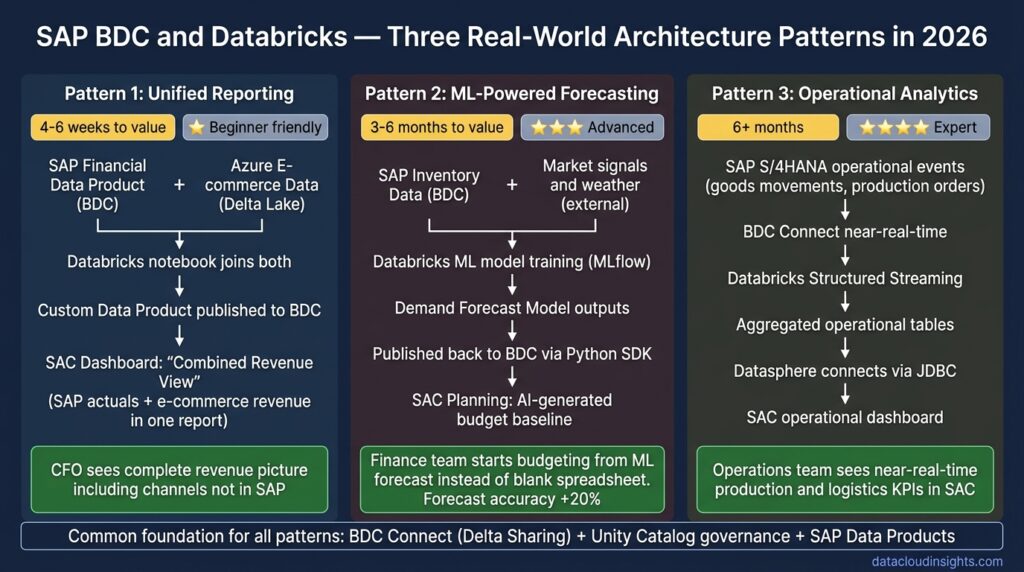
Based on current enterprise BDC and Databricks implementations the following patterns are emerging consistently.
Pattern 1 — SAP finance data plus external data for unified reporting
SAP Financial Statement Data Product flows from BDC into Databricks via Delta Sharing. E-commerce transaction data, loyalty programme data, and market benchmark data live in your existing Delta Lake. A Databricks notebook joins them. The result is published back to BDC as a custom Data Product. SAC consumes it for unified revenue reporting that combines SAP financial actuals with non-SAP revenue streams.
This pattern is the most common starting point on BDC and Databricks projects. It delivers visible business value quickly — usually within four to six weeks — and demonstrates the architecture working end to end before scaling to more complex use cases.
Pattern 2 — ML-powered forecasting with SAP data
SAP inventory levels, historical sales, and supply chain data from BDC flow into Databricks via Delta Sharing. Databricks ML engineers train demand forecasting models using this data combined with external market signals and weather data. Model outputs are published back to BDC as a Demand Forecast Data Product. SAC Planning uses the forecast as the starting point for the annual budgeting cycle — replacing the manual bottom-up budget entry process with an AI-generated baseline that finance managers review and adjust.
This pattern is more complex and typically takes three to six months to implement properly. The value is significant — forecast accuracy improvements of 15 to 30 percent are common when moving from manual Excel-based forecasting to ML models trained on complete SAP data.
Pattern 3 — Real-time operational analytics
SAP S/4HANA operational data — goods movements, production orders, quality notifications — flows into Databricks via BDC Connect with near-real-time latency. Databricks Structured Streaming processes the incoming data and maintains aggregated operational dashboards. SAC connects to these aggregations via Datasphere for business user consumption.
This pattern is the most technically demanding. Delta Sharing’s current latency characteristics make true real-time streaming more complex than batch scenarios. Architecture decisions around micro-batch frequency and latency tolerance significantly affect implementation complexity. Recommended for organisations with strong Databricks Structured Streaming experience.
The honest limitations — what BDC Connect does not solve
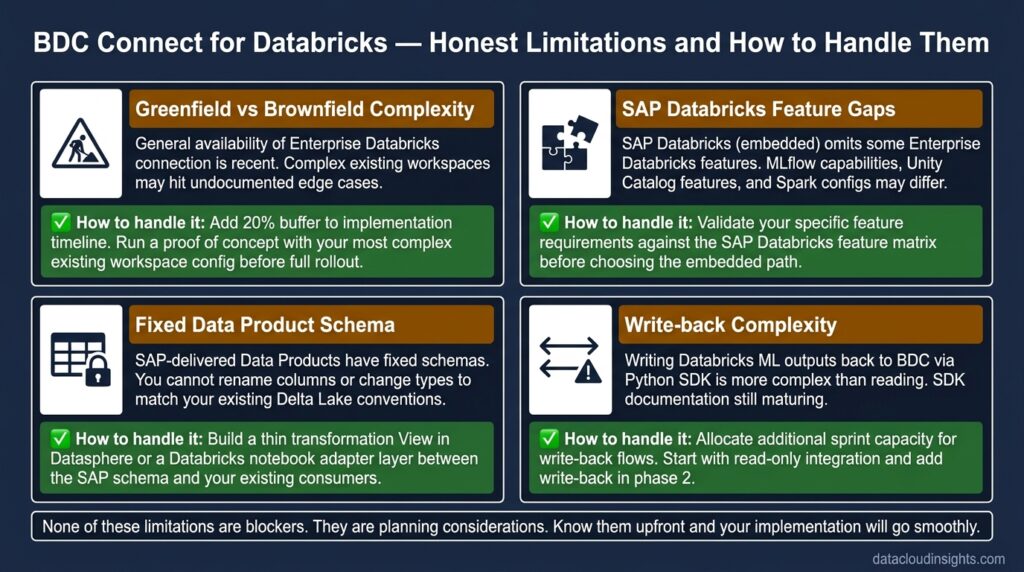
No technology deserves only positive coverage. Here are the honest limitations that every data engineer should understand before architecting around BDC Connect.
Greenfield versus brownfield complexity
The connector initially launched on AWS with SAP Databricks embedded included as a component. At this stage greenfield integration was the focus — customers could use the Databricks engine provided inside BDC, but connecting an existing external Databricks workspace was not yet generally available. (Qubika)
The general availability announcement is recent. The enterprise-grade brownfield path — connecting your existing mature Databricks workspace to BDC — is newer than the embedded SAP Databricks path. Expect some rough edges in tooling and documentation for complex existing workspace configurations. Build extra time into your implementation plan.
SAP Databricks feature differences
SAP Databricks omits a few of the important features that you usually find in a standard Enterprise Databricks deployment. (Medium)
If you are used to the full Enterprise Databricks feature set — specific MLflow capabilities, certain Unity Catalog features, specific Spark configuration options — SAP Databricks embedded in BDC may not have all of them. Validate your specific feature requirements against the SAP Databricks feature matrix before committing to the embedded path.
Data Product structure is SAP-controlled
Because SAP manages these data products, customers cannot arbitrarily change their structure — they are standardised content. (Medium)
The SAP-delivered Data Products have fixed schemas. You cannot rename columns, change data types, or restructure the hierarchy to match your existing Delta Lake conventions. If your existing pipelines expect SAP data in a specific format, you need a transformation layer between the BDC Data Product and your existing consumers — a Databricks notebook or a Datasphere View that adapts the SAP schema to your conventions.
Write-back complexity
Writing data back from Databricks to BDC via the Python SDK is more involved than reading SAP data into Databricks. The BDC Python SDK is relatively new. Documentation is growing but not yet as mature as the inbound direction. Allocate additional time for implementations that require significant Databricks-to-BDC write-back.
What this means for your career
Databricks led Gartner’s 2026 Magic Quadrant for AI Platforms. The bigger story is how that leadership intersects with SAP’s enterprise data dominance through the BDC partnership. (Qubika)
The data engineer who understands both platforms — who can configure BDC Connect, design the bidirectional sharing architecture, implement Unity Catalog governance for SAP Data Products, and build ML pipelines that consume SAP data and write results back to BDC — is genuinely rare right now.
Most SAP consultants do not have deep Databricks skills. Most Databricks engineers do not have SAP data expertise. The people who sit at the intersection of both worlds are in high demand and that demand is accelerating as more enterprises implement BDC alongside their existing Databricks investments.
The architecture patterns covered in this post — unified reporting, ML-powered forecasting, operational analytics — are the use cases that enterprise clients are asking for right now. Being able to design and implement them positions you not just as a data engineer but as the architect of the integration layer that connects an organisation’s SAP investment to its AI and analytics ambitions.
That is a valuable place to be in 2026.
What Part 4 covers
Part 3 gave you the complete picture of BDC Connect — what it is, how it works technically, how to set it up, the architecture patterns, and the honest limitations.
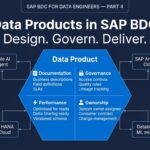
Part 4 goes deep on Data Products — the concept at the heart of BDC that most people understand at a surface level but few fully grasp in terms of design, governance, and the engineering decisions that determine whether a Data Product implementation succeeds or creates technical debt.
The complete BDC for Data Engineers series:
- Part 1 — What is SAP Business Data Cloud and why should data engineers care? (published)
- Part 2 — SAP BDC Architecture — the data engineer’s translation guide (published)
- Part 3 — SAP BDC and Databricks — partners not competitors (you are here)
- Part 4 — Data Products in SAP BDC — design, governance, and engineering decisions
- Part 5 — Connecting SAP BDC to Azure — the integration architecture
- Part 6 — SAP BDC vs your current stack — honest migration considerations
- Part 7 — SAP BDC governance and security — for engineers who care about data quality
- Part 8 — SAP BDC certification guide — C_BCBDC for data engineers
Subscribe below to get notified when Part 4 publishes.
Related reading on Data Cloud Insights
- SAP Business Data Cloud for Data Engineers — Part 1
- SAP BDC Architecture Explained
- SAP BDC Architecture with Real Examples
- SAP Analytics Cloud for Data Engineers — Part 1
Published by the Data Cloud Insights team — SAP data professionals with hands-on implementation experience across Europe, bridging modern cloud data engineering and the SAP BDC ecosystem.

Pingback: SAP Business Data Cloud Data Products: Design, Governance and Engineering Decisions (Part 4)
Pingback: SAP BDC vs Your Current Stack: Honest Migration Guide for Data Engineers 2026 (Part 6)
Pingback: SAP Business Data Cloud Governance and Security: A Data Engineer's Guide 2026 (Part 7)