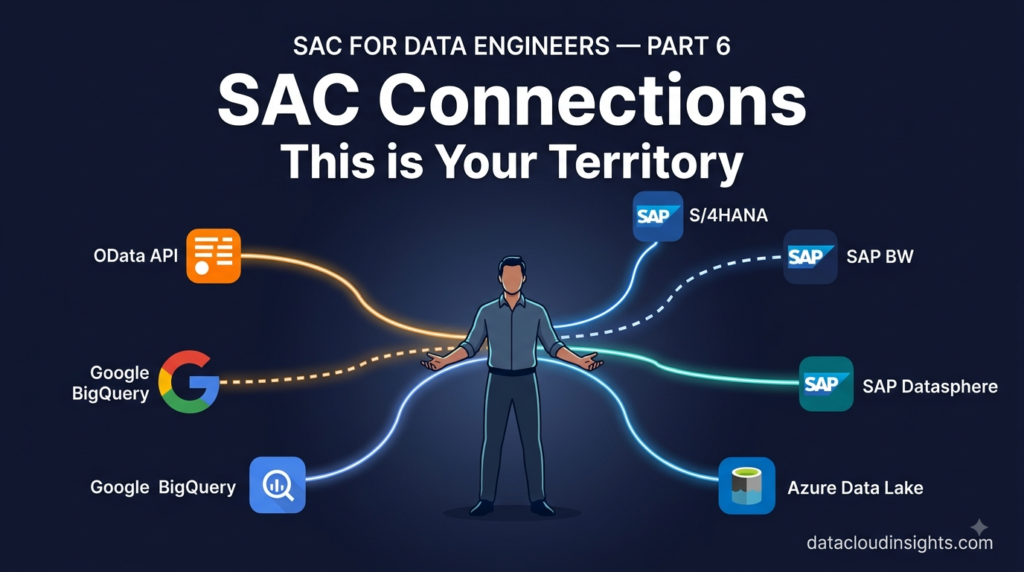

This is the final part of our SAP Analytics Cloud Terminology Series. We have followed Marie — a data engineer from Azure and Databricks — through six weeks on her first SAC project at RetailCo France. She survived the kickoff meeting, the data modelling workshop, the dashboard build, the planning workshops, and the security design. In every part her data engineering background was useful context but required significant translation. This part is different. Connections and integration is where Marie stops translating and starts leading. This is her territory.
The moment the tables turned
Week five. The project was deep into build. Stories were taking shape. The Planning Model was configured. Security design was documented and approved.
And the data connections — the pipes that bring actual RetailCo data into SAC from S/4HANA, from BW, and from RetailCo’s Azure Data Lake — were still not working properly.
Laurent called a technical session. He, Thomas, Marie, and the RetailCo IT architect sat around a laptop.
Laurent explained the connection issues to the group. CDS view authorisations in S/4HANA. Cloud Connector configuration for the on-premise BW system. The question of whether certain Azure Data Lake data should flow through SAP Datasphere before reaching SAC or connect directly.
He looked around the table for input.
Thomas knew the SAC side but was less confident on the S/4HANA and Azure specifics.
The IT architect knew the RetailCo infrastructure but not SAC’s connection requirements.
Laurent himself was strong on SAC and BW but less familiar with Azure Data Lake integration patterns.
Marie had been quiet for three minutes — which for Marie was unusual.
“I can take this,” she said.
Laurent looked at her. “You know Cloud Connector?”
“I know what it is trying to do. And I know the Azure side completely. Give me the BW connection requirements and I will figure out the rest.”
Laurent slid his laptop across the table.
Three days later all five connections were working. Marie had not known SAC connection terminology when the project started. But she understood data movement, network architecture, authentication patterns, and integration design at a level that made the SAC-specific details learnable in hours rather than weeks.
This is the part where data engineers reading this series will feel most at home. The concepts translate. The mental models work. The terminology is different but the underlying patterns are familiar.
Let us go through them.
Term 1 — CDS View: The API layer you connect to in S/4HANA
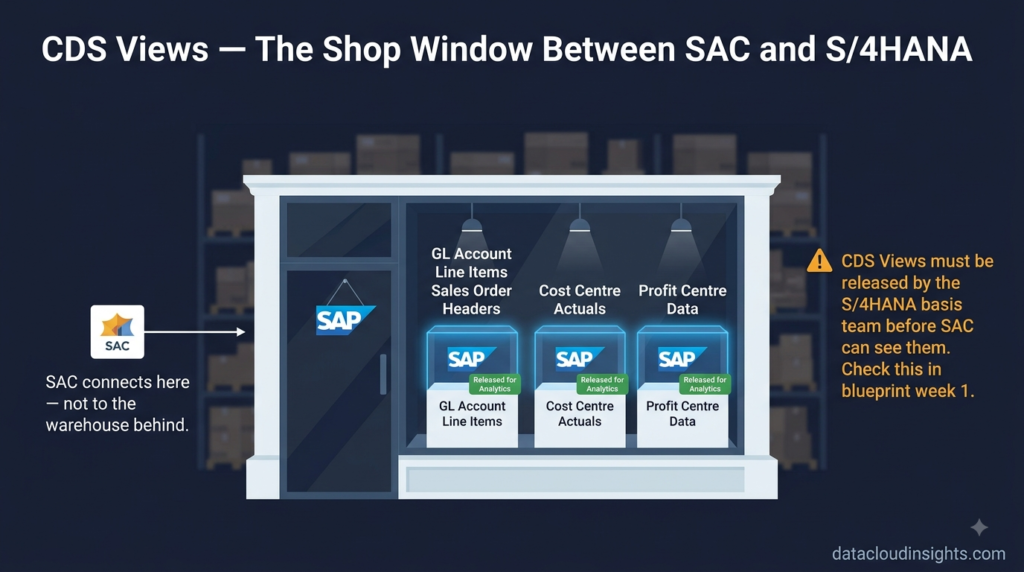
When SAC connects live to SAP S/4HANA — the system that holds RetailCo’s financial transactions, sales orders, inventory movements, and cost postings — it does not connect to raw database tables. It connects to CDS Views.
CDS stands for Core Data Services. A CDS View is a structured, pre-defined view of S/4HANA data — optimised for analytics consumption, with business logic embedded, authorisation checks built in, and exposed through a standardised interface.
Think of a CDS View as a well-designed REST API endpoint for your S/4HANA data. You do not connect to the database directly. You connect to the API. The API handles the complexity underneath — joins, calculations, security, performance optimisation — and returns clean, structured data.
Marie understood this immediately.
“So CDS Views are like the gold layer tables in our Delta Lake. They are the clean, business-ready version of the data that consumers should use — not the raw source tables.”
Exactly right. With one important addition — CDS Views are delivered by SAP as part of the S/4HANA product, not built by the customer. SAP ships hundreds of standard CDS Views covering every business process — finance, sales, procurement, manufacturing, HR. The customer’s job is to identify which CDS Views contain the data they need and ensure those views are released for analytics consumption.
That last point — released for analytics consumption — is where projects most often hit delays.
Not every CDS View in S/4HANA is automatically available to SAC. Views must be explicitly released by the S/4HANA system administrators before SAC can see and connect to them. The release process happens in the S/4HANA system through a specific configuration transaction. Until a view is released — even if SAC has a perfect connection to S/4HANA — that view does not appear in SAC’s model browser.
On the RetailCo project Thomas had configured the S/4HANA connection in SAC weeks earlier. The connection itself was working — SAC could reach S/4HANA. But when Marie tried to browse for the General Ledger CDS View she needed for the financial reporting Story, it did not appear.
The IT architect checked the S/4HANA system. The view existed. But it had not been released for external analytics consumption.
Two hours and one basis administrator later — the view was released and visible in SAC.
The practical lesson — identify which CDS Views you need during the blueprint phase. Check with the S/4HANA basis team that each one is released. Do not assume. A missing release is a small task that causes large delays when discovered during build.
One more thing about CDS Views that matters for data engineers — they respect S/4HANA authorisations. When SAC queries a CDS View using a technical user’s credentials, the data returned is filtered by that technical user’s authorisations in S/4HANA. If the technical user cannot see certain company codes or cost centres in S/4HANA — those will not appear in SAC either. Design your technical user authorisations carefully. Too restrictive and data is missing. Too permissive and you have a security gap.
Term 2 — SAP Cloud Connector: The secure tunnel for on-premise systems
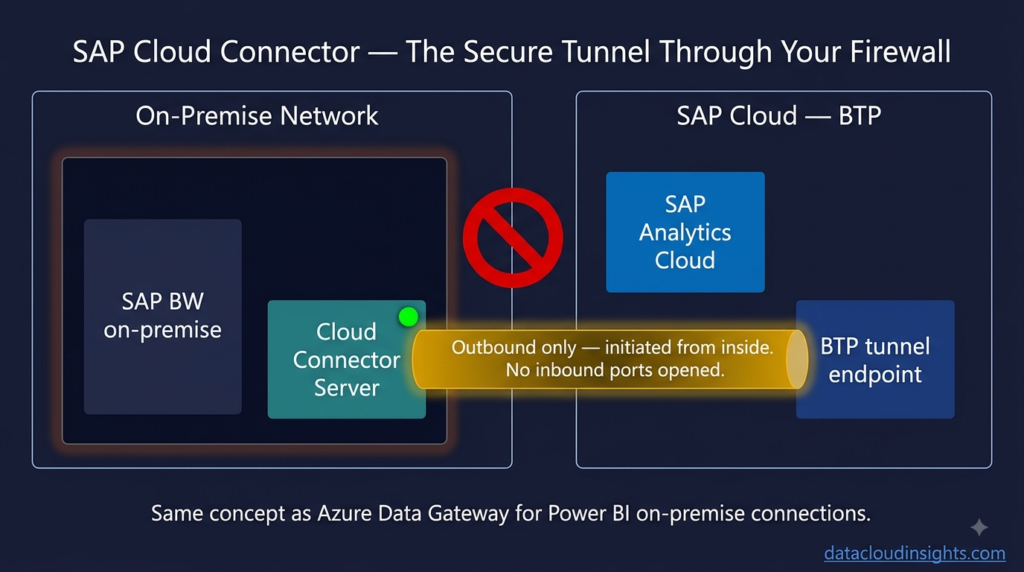
RetailCo’s SAP BW system — which holds seven years of historical financial data that the S/4HANA system does not have — runs on-premise in RetailCo’s own data centre. Not in the cloud. Behind firewalls. On a network that the public internet cannot reach.
SAC is a cloud service. It runs on BTP in SAP’s data centres. It cannot reach RetailCo’s on-premise BW system directly.
The SAP Cloud Connector solves this problem.
Cloud Connector is a piece of software installed on a server inside RetailCo’s on-premise network — a server that can reach both the internal BW system and the internet. It creates an encrypted outbound tunnel from the on-premise network to SAP BTP. Once the tunnel is established, SAC can send requests through BTP, through the Cloud Connector tunnel, and reach the on-premise BW system — without RetailCo needing to open any inbound firewall ports.
Marie looked at the Cloud Connector architecture diagram for approximately thirty seconds.”It is an outbound-only VPN tunnel with a relay in BTP,” she said. “Like Azure Data Gateway for Power BI connecting to on-premise data sources.”
Thomas confirmed that was exactly right.
Azure Data Gateway is the Microsoft equivalent — a piece of software installed on-premise that creates a secure tunnel allowing cloud services like Power BI and Azure Data Factory to reach on-premise data sources without inbound firewall rules. Same architecture. Different vendor. Different name.
For a data engineer the Cloud Connector is immediately intuitive because the pattern is familiar. The SAP-specific details — which BTP subaccount to register with, which S/4HANA or BW system paths to expose through the tunnel, how to configure the Cloud Connector administration console — are learnable in a day.
The operational consideration that Marie raised — and that Laurent had not fully thought through — was monitoring and resilience.
“What happens if the Cloud Connector server goes down?” Marie asked. “SAC loses connectivity to the on-premise BW system. Live connections fail. Scheduled imports fail.”
“So it is a single point of failure.” “In a basic installation yes.”
“Can you run two Cloud Connector instances in high availability mode?”
Laurent looked at Thomas. Thomas looked at Laurent.
“Yes,” Laurent said slowly. “SAP supports a master and shadow Cloud Connector instance for high availability. We should implement that.”
It went on the architecture document. Another data engineer instinct — if something is a single point of failure, make it not a single point of failure — that improved the SAC architecture on this project.
For your project — Cloud Connector is straightforward to install and configure. The administration console is well-documented. The complexity is operational — monitoring, high availability, certificate management, and ensuring the on-premise server running Cloud Connector is properly maintained. Treat it like infrastructure. Not like a one-time configuration.
Term 3 — SAP Datasphere: The data fabric between source systems and SAC
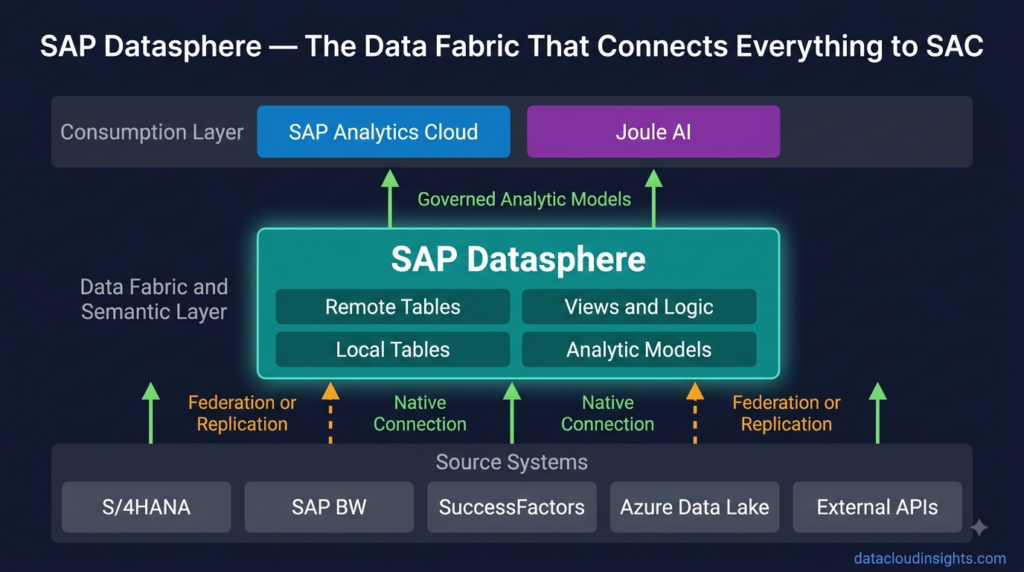
This is the term that generates the most questions in 2026 SAC projects — and the one with the most confusion about what it is and when you need it.
SAP Datasphere is SAP’s modern data integration and modelling platform. It connects to multiple data sources — SAP and non-SAP — applies data governance, transformation, and modelling, and exposes clean analytical data to consuming tools like SAC.
The simplest way to describe it — Datasphere is SAP’s answer to what Azure Databricks plus dbt does in a Microsoft data stack. It is the transformation and semantic layer that sits between raw source data and analytics consumption.
Marie’s reaction to Datasphere was interesting. She had been working with Azure Databricks for three years. She had strong opinions about data transformation architecture. And her first reaction to Datasphere was scepticism.
“We already have Databricks. Why would we add Datasphere in the middle?”
It is a fair question and one that comes up on every project with an existing modern data platform.
Laurent’s answer was nuanced.
“For your Azure Data Lake data — you probably do not need Datasphere. SAC can connect to an OData service on top of your Delta Lake data or import from your gold layer directly. Your Databricks stack is already doing the transformation work. Adding Datasphere in the middle would be redundancy.
For your SAP data — Datasphere is a different conversation. S/4HANA, BW, SuccessFactors, Ariba — these systems speak SAP’s data language. Datasphere understands that language natively. It can federate across multiple SAP systems, apply SAP’s business semantics, handle currency conversion, respect SAP’s organisational hierarchies, and expose the result to SAC as a clean, governed Analytic Model. Doing that in Databricks would require significant custom engineering.”
Marie processed this. “So Datasphere is valuable when your source data is SAP-heavy. Less valuable when you already have a mature non-SAP data platform doing that work.”
“That is the honest answer. On a project where the company runs entirely on SAP and has no existing modern data platform — Datasphere plus SAC is the natural architecture. On a project like RetailCo where a mature Azure Data Lake exists alongside SAP systems — it is a more nuanced decision.”
The RetailCo decision — after two architecture discussions involving Marie, Laurent, and the IT architect — was to use Datasphere selectively. SAP-origin data — S/4HANA financials, BW historical data — flows through Datasphere which handles the SAP-specific semantics and exposes Analytic Models to SAC. Non-SAP data — the Azure Data Lake data from RetailCo’s e-commerce platform and loyalty programme — connects to SAC directly via OData services on top of the gold layer Delta Lake tables. Two paths. Each using the tool best suited to the data origin.
For your project — the question to ask is not “should we use Datasphere?” in the abstract. The question is “where does our data come from, and which integration path serves each data source best?” The answer will be different for every organisation.
Term 4 — SAP Business Data Cloud: The unified platform that changes the conversation
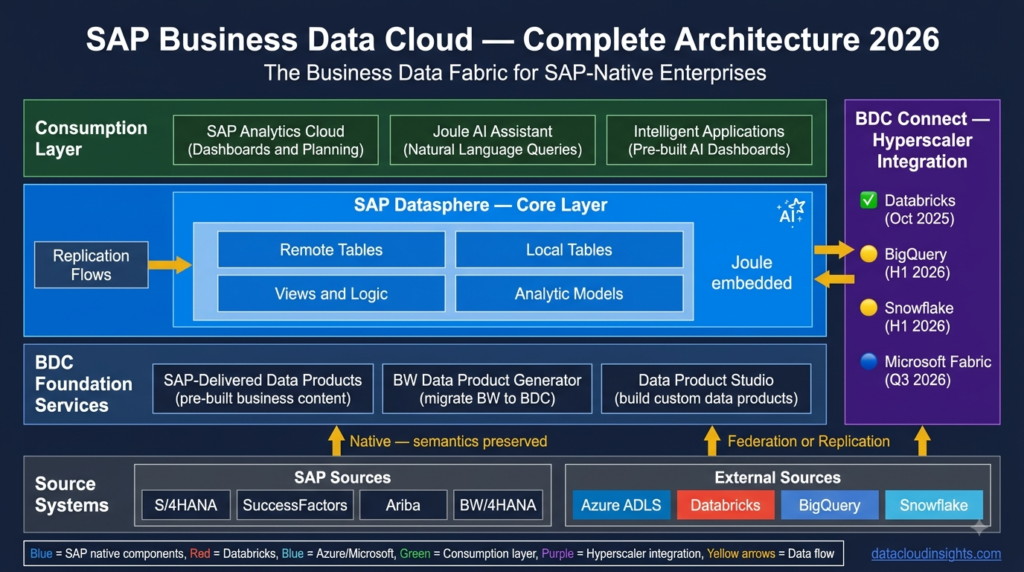
SAP Business Data Cloud — BDC — is SAP’s newest and most ambitious platform announcement. Introduced in 2024 and increasingly prominent in 2026, BDC combines SAP Datasphere and SAC with pre-built data products for SAP applications into a single unified platform.
Where the traditional implementation path was — buy SAC, buy Datasphere, connect them, build the integration, design the models, build the Stories — BDC offers a different proposition. Buy BDC. Get SAC and Datasphere together. Get pre-built data products for S/4HANA Finance, Supply Chain, HR, and more. Get pre-built SAC Stories. Get pre-built Datasphere models. Start with something rather than nothing.
Marie’s reaction to BDC was the most positive of any SAP product she had encountered on the project.
“This is what we have been trying to build for six months,” she said after Laurent explained it. “SAP is shipping it pre-built.”
That is both accurate and slightly oversimplified. BDC pre-built content covers standard SAP business processes well. Custom requirements — RetailCo’s specific store performance metrics, their unique planning process, their e-commerce data integration — still require custom build on top of the BDC foundation. But the foundation is significantly more complete than starting from scratch.
For projects starting in late 2026 and beyond — BDC is increasingly the starting point rather than a combination of separate SAC and Datasphere implementations. If you are starting an SAC project today, understand where BDC fits in the vendor’s roadmap for your region and industry. It may change your implementation approach significantly.
The key technical point for data engineers — BDC runs on BTP. SAC is the analytics and planning layer within BDC. Datasphere is the data layer. The connection terminology, the security concepts, the transport process — everything covered in this series applies within a BDC implementation. BDC changes the pre-built content available. It does not change the fundamental platform architecture.
Term 5 — OData: The universal connector for everything else
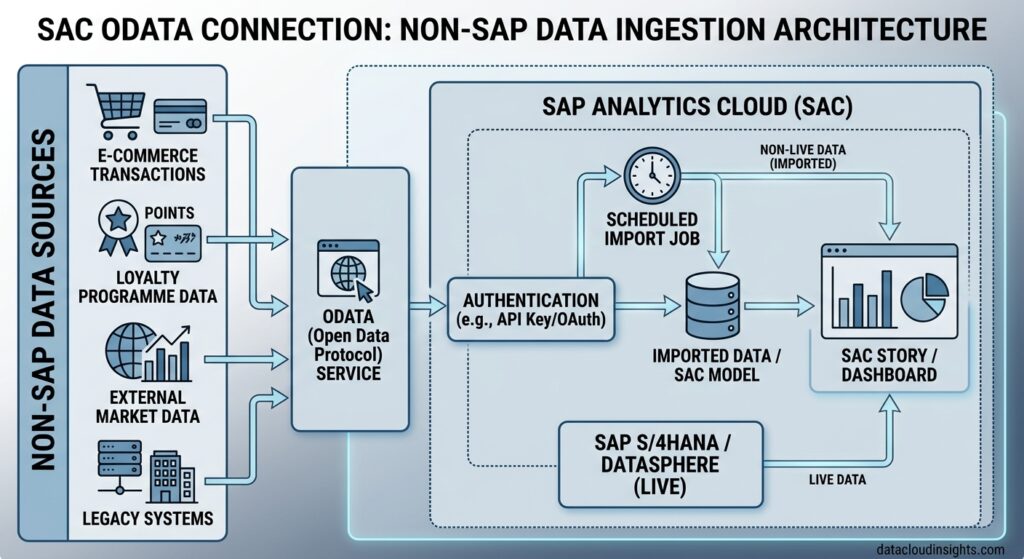
Every SAC project has data that does not come from SAP systems. Loyalty programme data from a marketing platform. E-commerce transaction data from a custom web platform. External market data from a third-party provider. Legacy system data that has not been migrated to S/4HANA yet.
For these sources SAC’s most versatile connector is OData.
OData — Open Data Protocol — is a REST-based standard for exposing data as a web service. Many modern systems expose OData endpoints. And for systems that do not, building a thin OData service on top of an existing API or database is straightforward — especially for a data engineer.
Marie had encountered OData before in her Azure work — Azure Data Factory has an OData connector for consuming data from systems that expose OData APIs. The same concept applies in SAC.
RetailCo’s loyalty programme platform did not have a native SAC connector. It did have an OData API that the platform vendor had built for integration purposes. Marie created an OData connection in SAC pointing to the loyalty platform’s OData endpoint, authenticated using an API key, and within two hours had loyalty programme member data — total members, active members, redemption rates, average spend — available as a data source in SAC.
The finance team had never seen loyalty data alongside their financial data in the same report. The first Story that combined store revenue from S/4HANA with loyalty programme engagement from the OData connection — showing the correlation between loyalty programme penetration and store revenue performance — became one of the most-requested reports after go-live.
For data engineers the important thing to know about OData in SAC — SAC supports OData as an import connection, not a live connection. Data is imported on a schedule rather than queried in real time. For most non-SAP sources this is acceptable — real-time connectivity to external systems is rarely critical for analytics purposes.
If you have a source system that does not expose OData natively — and you need to connect it to SAC — the pattern Marie used on the RetailCo project is a practical solution. Build a thin OData service on top of your gold layer Delta Lake table. Deploy it on Azure API Management. Point SAC’s OData connector at it. SAC imports from your Delta Lake data on a schedule. Clean separation between your data engineering layer and the SAC consumption layer.
Marie’s final train ride
Week ten. Go-live was three days away.
Marie was on the last RER of the evening. Her MacBook was open but she was not working. She was reading back through her notes from the project.
Ten weeks of notes. Forty pages. Six parts of a mental glossary she had built for herself — from the terms she had not understood in the kickoff meeting to the connection architecture she had led in week five.
She thought about where she had started. A data engineer who had never opened SAP. Who had typed “what is SAP Analytics Cloud” into Google the evening her manager told her she was joining the project. Who had spent the first project meeting writing down words she did not understand. She thought about where she was now.
She had built three of the twelve Stories delivered on the project. She had designed and implemented two of the five data connections. She had written the transport runbook. She had caught the single point of failure in the Cloud Connector architecture. She had found the pre-built SAP financial statement content in the Content Network that saved the team two weeks of build time.
She had done all of that while learning SAC from scratch in ten weeks. She closed her notebook. The train pulled into Gare du Nord. She had one thought before she put her MacBook in her bag.
Data engineering and SAP analytics are not as different as they appear from the outside. The tools have different names. The terminology is different. The mental models need translation. But underneath — data is data. Pipelines are pipelines. Models are models. Good architecture is good architecture.
The translation takes time. But it is worth doing.
The complete terminology series — what you now know
If you have read all six parts of this series you have covered forty terms across six categories. More importantly you have seen how those terms connect to each other — how the Model design from Part 2 enables the Drill Down from Part 3, how the Version concept from Part 4 connects to the Data Access Controls from Part 5, how the CDS Views from Part 6 feed the Models that power the Stories.
SAC is not a collection of disconnected features. It is a platform where every concept connects to every other concept. Understanding the vocabulary is the first step. Seeing the connections between the vocabulary is what makes you genuinely effective on a project.
The complete series:
- Part 1 — Platform basics: SAC, BTP, Tenant, Story, Analytic Application
- Part 2 — Data modelling: Model, Dimension, Measure, Account Dimension, Hierarchy
- Part 3 — Dashboard building: Page, Widget, KPI Tile, Input Control, Drill Down, Linked Analysis
- Part 4 — Planning terms: Version, Data Action, Spreading, Data Locking, Planning Sequence
- Part 5 — Security and Admin: Role, Data Access Control, Transport, Content Network
- Part 6 — Connections: CDS View, Cloud Connector, Datasphere, BDC, OData (you are here)
What to read next on Data Cloud Insights
If this series gave you the foundation you needed — these articles go deeper on specific topics:
- SAP Analytics Cloud Complete Beginner’s Guide
- How to Build Your First SAP Analytics Cloud Story
- SAP Analytics Cloud Data Sources: Complete Connection Guide
- SAP Analytics Cloud Planning: Build Your First Budget Model
- SAP Analytics Cloud Performance: 10 Tips to Make Reports Faster
- SAP Analytics Cloud vs Power BI: Honest Comparison
Written by someone who watched a data engineer walk into her first SAC project not knowing what a tenant was — and walk out of it having led the connection architecture that made the whole thing work. The best thing that can happen on an SAP project is exactly that.