
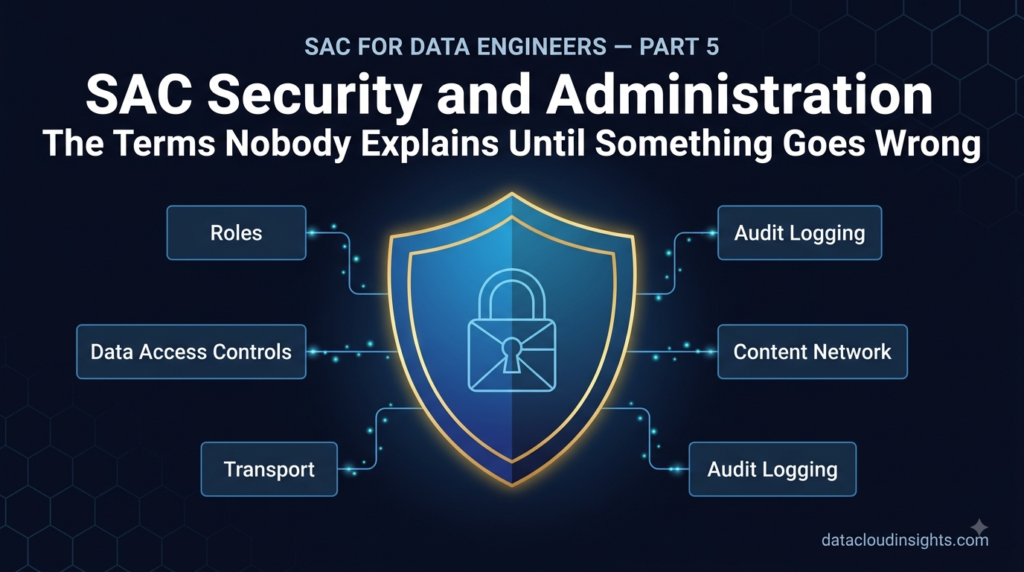

This is Part 5 of our SAP Analytics Cloud Terminology Series. We have covered platform basics, data modelling, dashboard building, and planning. Now we tackle the topic that every project team underestimates — Security and Administration. This is not the glamorous part of SAC. Nobody gets excited about role assignments and transport management. But more SAC go-lives have been delayed by security design problems than by any technical issue. Read this before your project reaches UAT.
The conversation that happens on every project
There is a conversation that happens on virtually every SAC project I have been involved in. It happens somewhere between the end of the build phase and the start of User Acceptance Testing. It goes roughly like this.
The project manager says: “We need to start UAT next week. Is security ready?” Silence. Then someone says: “We have not really started the security design yet.”
More silence. Slightly more uncomfortable this time. “We thought we would do it at the end.”
Security and administration is always the thing that gets pushed to the end. Because it feels like it can be done quickly. Because it is less interesting than building Stories and Planning Models. Because there is always something more urgent demanding attention during the build phase.
And then UAT starts and the business users cannot see the right data. Or they can see data they should not see. Or the transport from development to production fails because nobody configured the transport route. Or the content the team built in development does not exist in production because nobody set up the content migration properly.
Three weeks of go-live delay. Every time.
Do not be that project. Understand these four terms early and design your security and administration approach before the build starts — not after it finishes.
Term 1 — Role: Who can do what in SAC
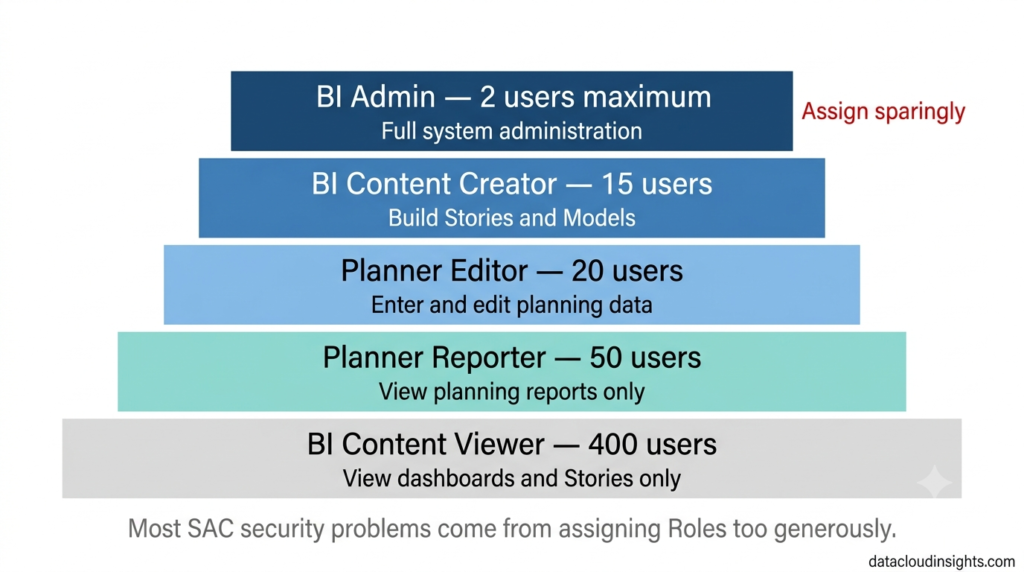
Every SAC user is assigned one or more Roles. A Role is a named set of permissions that controls what a user can see, access, and do within the SAC tenant.
SAP delivers a set of standard Roles that cover the vast majority of use cases. Understanding what each one does — and more importantly what it does not do — is the foundation of any SAC security design.
BI Admin is the most powerful Role in SAC. A BI Admin can do everything — create and delete content, manage connections, manage users, configure the tenant, access all data. On most projects only one or two people have this Role. Usually the SAC system administrator and the lead technical consultant during the project. After go-live it should be even more restricted.
Marie made the mistake of assuming that because she was the data engineer on the project she should have BI Admin access. Laurent corrected her on day one of the security design workshop.
“BI Admin gives you access to everything in the tenant. Including the production planning data for all 80 stores. Including salary information if HR builds their reports in this tenant. Do you need access to all of that to do your job?”
Marie considered it. “No.”
“Then you do not need BI Admin. We give you the minimum access you need to do your job. Nothing more.”
This is the principle of least privilege and it applies to SAC exactly as it applies to any data platform. In Databricks you do not give every data engineer admin access to the production workspace. In SAC you do not give every consultant BI Admin access to the production tenant.
BI Content Creator is the Role for people who build Stories, models, and connections — consultants during the project, and power users after go-live who need to create their own reports. Content Creators can build and share content but cannot manage users or configure the tenant.
BI Content Viewer is the Role for standard business users — the 500 RetailCo employees who need to open dashboards and view reports but do not need to create or change anything. This is the most commonly assigned Role on any SAC project. In most enterprise deployments, 80 to 90 percent of users are Content Viewers.
Planner Reporter is for users who need to view planning reports but not enter any data. A regional controller who needs to see the budget versus actual report but does not enter budget numbers themselves.
Planner Editor is for users who actively enter planning data — the finance managers who type budget numbers into planning tables, the cost centre managers who submit their headcount plans. Planner Editors can read and write to the Planning Models they are authorised to access.
The common mistake on projects is assigning Roles too generously. Content Creator to everyone because it is easier than figuring out who really needs it. BI Admin to the whole project team because it avoids access issues during build. These decisions made for convenience during the project become security vulnerabilities in production and compliance problems when auditors arrive.
Design your Role concept during the blueprint phase. Document who gets what Role and why. Get sign-off from the business before UAT. Then you are not scrambling to restrict access three days before go-live.
Term 2 — Data Access Control: The right data to the right people
Roles control what users can do. Data Access Controls control what data they can see.
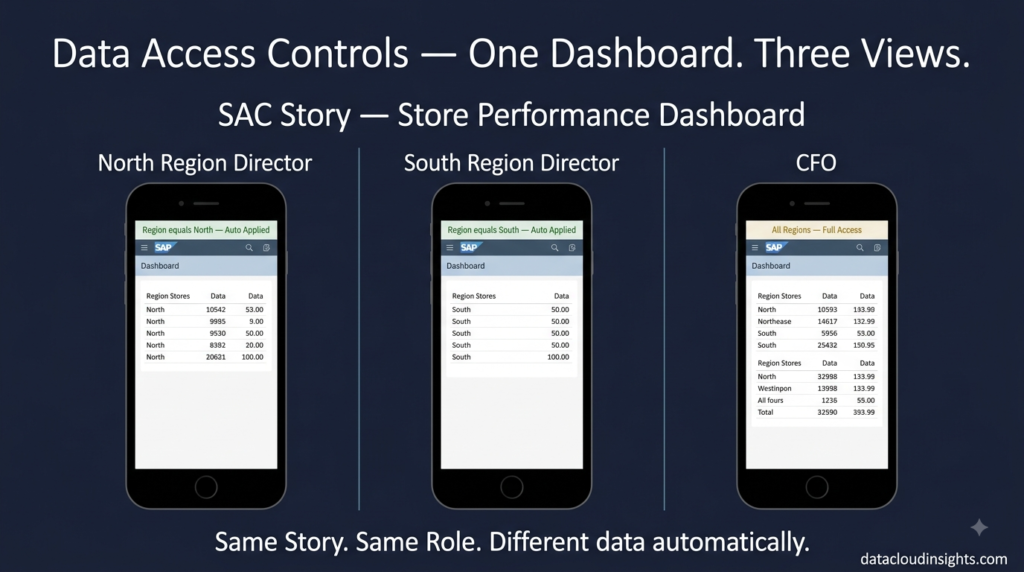
This is a critical distinction that beginners consistently conflate. Two users can have exactly the same Role — both BI Content Viewers — and see completely different data when they open the same Story. Because their Data Access Controls are different.
The North region director and the South region director both open the RetailCo store performance Story. Same Story. Same Role. But the North director sees only the twelve North stores and the South director sees only the fourteen South stores. Neither can see the other’s data.
That restriction is implemented through Data Access Controls — dimension-level filters applied to specific users or user groups that restrict which dimension members they can access in the data.
In SAC you define a Data Access Control by specifying a dimension — Region for example — and then assigning specific members of that dimension to specific users or groups. The North director is assigned the North member of the Region dimension. When she opens any Story connected to a Model that has this Data Access Control applied — she automatically sees only North data. She does not need to apply any filter herself. She cannot remove the restriction. It is invisible to her but always active.
From a data engineering perspective Data Access Controls are row-level security — the same concept as row-level security in Power BI, column masking in Databricks Unity Catalog, or predicate-based access control in Delta Lake. The principle is identical. The implementation is specific to SAC.
Marie spent an entire day on Data Access Controls during the security design workshop and described it afterwards as “the most important day of the project that nobody told me would be important.”
She had three observations that are worth sharing.
First — Data Access Controls need to be designed for the most complex user, not the simplest one. Designing DACs for the regional directors was straightforward — one region per director. Designing DACs for the CFO (all regions), the regional controllers (all stores in one region), the store managers (one store only), and the finance team (all regions, all stores, but only their own cost centre’s planning data) required a proper access matrix designed upfront.
Second — Data Access Controls interact with Planning Model authorisations in ways that are not always intuitive. A user who has read access to a Version via Data Access Controls but no write access via their Role — can they see the data? Can they accidentally change it? Test every combination before UAT.
Third — Data Access Controls are maintained over time. When a new store opens, the relevant store manager needs to be added. When a regional director changes regions, their DAC needs updating. When an employee leaves, their DAC needs removing. Build a maintenance process for this from day one — do not leave it as a manual admin task that nobody owns.
The practical advice — create an Access Matrix spreadsheet during blueprint. Rows are user types. Columns are dimension members. Cells show what each user type can see. Walk through every user type with the business before building anything. Sign it off. Then build your Data Access Controls from that document.
If you build first and design access later — you will rebuild. Guaranteed.
Term 3 — Transport: Moving content between tenants safely
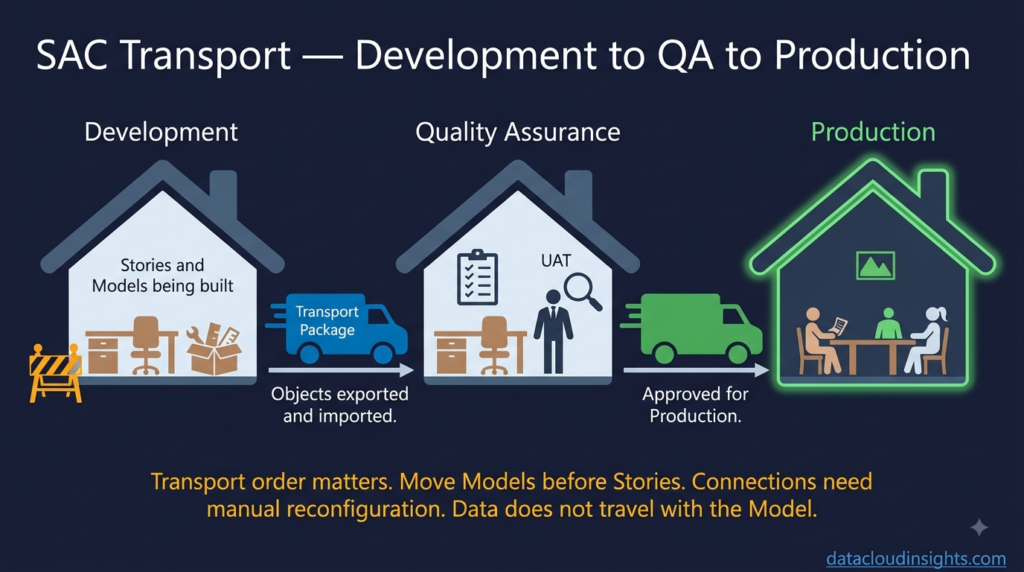
In Part 1 we established that most SAC projects have three tenants — Development, Quality Assurance, and Production. Content is built in Development, tested in QA, and then moved to Production for go-live.
The process of moving content between tenants is called a Transport.
If you come from SAP ERP or BW background — you know exactly what a transport is. Same concept. Different tool. The Transport Management System in SAP ERP is one of the most important and most respected pieces of SAP infrastructure. SAC transports are simpler but carry the same fundamental principle — controlled, documented movement of changes from development to production.
If you come from a data engineering background — think of a Transport as a deployment pipeline. The equivalent of promoting code from a feature branch through staging to production in a CI/CD pipeline. Different environment. Same content. Controlled process.
In SAC, content that can be transported includes Stories, Analytic Applications, Models, Data Actions, Planning Sequences, and certain connection configurations. Content is packaged into a Transport Package in the source tenant and then imported into the target tenant.
The RetailCo project transport process works like this.
Thomas builds the store performance Story in the Development tenant. When it is ready for testing he creates a Transport Package containing the Story and the underlying Model, exports the package as a file, and imports it into the QA tenant. The business team tests in QA. When they sign off, Thomas creates another Transport Package and imports it into the Production tenant.
This sounds straightforward. In practice several things go wrong on projects that do not plan their transport process carefully.
Connection configurations do not transport cleanly. The connection in Development pointing to the Development S/4HANA system does not automatically point to the Production S/4HANA system after transport. Connection parameters need to be reconfigured manually in each target tenant. Document your connection configurations for every tenant before go-live week. Not during it.
Models transport but data does not. When you transport a Planning Model to Production, the model structure arrives — dimensions, versions, measures, hierarchies. The planning data that finance managers entered in QA for testing does not come with it. Production starts empty. This surprises finance teams who tested extensively in QA and assume their test data will be there. It will not. Plan for a Production data load before go-live.
Transport order matters. If a Story depends on a Model, the Model must be transported before the Story. If a Data Action depends on a Model structure, the Model must be current in the target tenant before the Data Action is transported. Transport packages must be sequenced correctly or imports fail. Always transport in dependency order — foundation objects first, dependent objects second.
Transport is not version control. This is important. SAC transports move the current state of content from one tenant to another. They do not maintain a history of every change made to a Story or Model in Development. If you need version control — and on serious projects you do — implement a practice of creating new versions of Stories and Models before making significant changes, so you can roll back if needed. Some teams use content export to external storage as a backup mechanism.
Marie built the transport runbook for the RetailCo project — a document listing every object to be transported, in dependency order, with the tenant source and target for each step, the person responsible, and the validation check to confirm the transport succeeded. It took her half a day to build and saved the go-live team two days of confusion during cutover.
Build the transport runbook early. Transport in lower environments first to validate the process. Do a full dress rehearsal of the Production transport a week before go-live. Surprises during actual go-live cutover are expensive and stressful.
Term 4 — Content Network: SAP’s library of pre-built SAC content
This one is less about governance and more about not wasting time reinventing things that already exist.
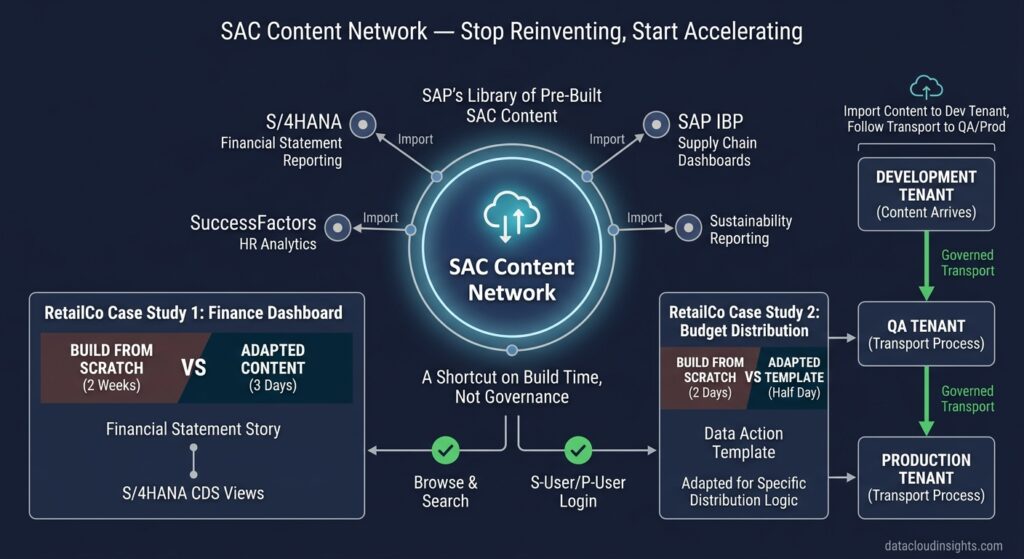
The Content Network is SAP’s library of pre-built SAC content — Stories, Models, Analytic Applications, and Data Actions — that customers can download directly into their SAC tenant as starting points.
SAP and SAP partners contribute content packages covering common business processes — Financial Statement reporting connected to S/4HANA, HR analytics connected to SuccessFactors, Supply Chain dashboards connected to SAP IBP, Sustainability reporting, and many more. The quality varies — some packages are excellent starting points, others are outdated or too generic to be useful. But checking the Content Network before starting any significant build is always worth ten minutes.
The RetailCo project found two useful content packages in the Content Network.
The first was a Financial Statement Story pre-connected to S/4HANA CDS views for balance sheet and P&L reporting. Laurent imported it into the Development tenant, showed it to the CFO, and the CFO’s response was “can we use this as the starting point for our finance dashboard?” They adapted it over three days rather than building from scratch over two weeks. Significant time saving.
The second was a pre-built Data Action template for top-down budget distribution that Laurent adapted for RetailCo’s specific distribution logic. Half a day of adaptation versus two days of building from scratch.
To access the Content Network — in your SAC tenant go to the main menu, find Content Network, browse by category or search by keyword. You need an S-User or P-User login to download content packages.
One important note — content downloaded from the Content Network arrives in your Development tenant. It still needs to go through your normal transport process to reach QA and Production. It is not a shortcut around governance. It is a shortcut on build time.
The security design conversation you should have on day one
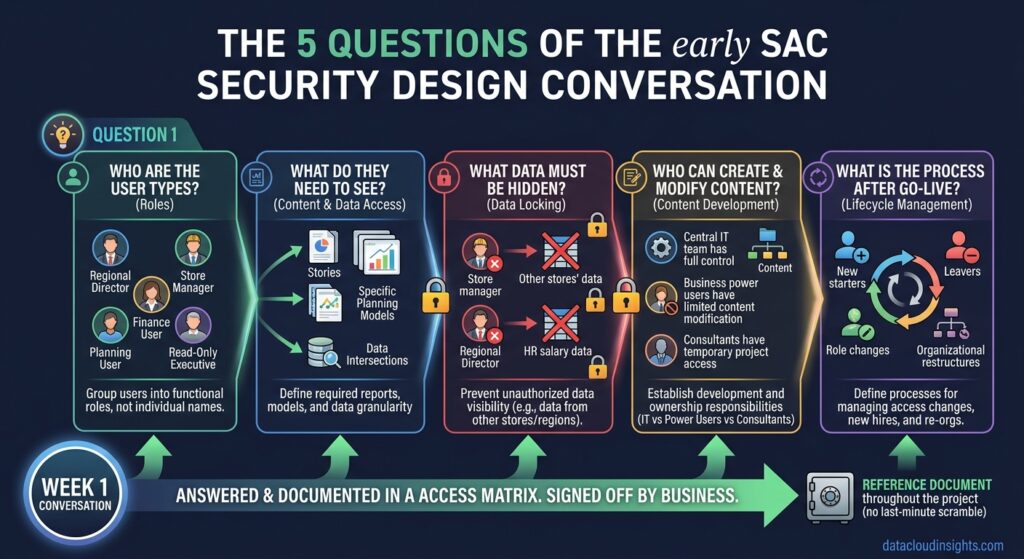
Every SAC project should have a security design conversation in the first week. Not the last week. Not after build is finished. The first week.
The conversation needs to answer five questions.
Who are the different types of users? Not individual names — types. Regional directors, store managers, finance controllers, planning users, read-only executives. Map them out.
What does each user type need to see? Which reports, which planning models, which data.
What data should each user type NOT see? This is equally important. The store manager should not see other stores’ data. The regional director should not see other regions’ planning submissions. The finance controller should not see HR salary planning data.
Who can create and modify content? Just the central IT team? Power users in the business? Consultants only during the project?
What is the process for managing access after go-live? New starters, leavers, role changes, organisational restructures. SAC access does not manage itself.
Five questions. Answered in the first week. Documented in an Access Matrix. Signed off by the business. Then your security design is a reference document throughout the project rather than a last-minute scramble before go-live.
What happens when you get this right
The RetailCo go-live was clean.
Not perfect — no go-live ever is. But the security and administration had been designed, tested, and signed off three weeks before go-live. The transport runbook had been rehearsed twice. The Data Access Controls had been tested by real users in UAT — not by the project team pretending to be users. The Role assignments had been reviewed by the business and the compliance team.
On go-live day 500 RetailCo employees logged into the Production tenant. Every person saw exactly the data they should see. Nobody called the helpdesk because they could see someone else’s data. Nobody called because they could not see their own data. The regional directors opened the store performance Story, saw their region’s stores, and started their Monday morning exactly as they had in UAT.
Laurent called it an uneventful go-live. In SAP project terms that is the highest possible compliment.
Marie called it the result of doing the boring work properly.
She was right.
Part 6 is the final part — and for Marie it is the homecoming. Connections and Integration. CDS Views, Cloud Connector, SAP Datasphere, SAP Business Data Cloud, OData. The part where her data engineering background stops being a disadvantage and becomes the biggest asset on the project. Subscribe below.
The complete series:
- Part 1 — Platform basics: SAC, BTP, Tenant, Story, Analytic Application
- Part 2 — Data modelling: Model, Dimension, Measure, Account Dimension, Hierarchy
- Part 3 — Dashboard building: Page, Widget, KPI Tile, Input Control, Drill Down, Linked Analysis
- Part 4 — Planning terms: Version, Data Action, Spreading, Data Locking, Planning Sequence
- Part 5 — Security and Admin: Role, Data Access Control, Transport, Content Network(you are here)
- Part 6 — Connections: CDS View, Cloud Connector, Datasphere, BDC, OData
What to read next on Data Cloud Insights
If this series gave you the foundation you needed — these articles go deeper on specific topics:
- SAP Analytics Cloud Complete Beginner’s Guide
- How to Build Your First SAP Analytics Cloud Story
- SAP Analytics Cloud Data Sources: Complete Connection Guide
- SAP Analytics Cloud Planning: Build Your First Budget Model
- SAP Analytics Cloud Performance: 10 Tips to Make Reports Faster
- SAP Analytics Cloud vs Power BI: Honest Comparison
- SAP Analytics Cloud Certification Guide
Written by someone who has pushed back a go-live by three weeks because the security design was left until the last moment — and who now starts every project with the security design conversation in week one regardless of how many other things are competing for attention.

Pingback: SAP Analytics Cloud Data Modelling: What Data Engineers Need to Know (Part 2)
Pingback: SAP Analytics Cloud Dashboards: A Data Engineer's Guide to Building Stories (Part 3)
Pingback: SAP Analytics Cloud Connections: CDS Views, Datasphere and Cloud Connector Explained (Part 6)